Build a powerful HR tech stack for 2026. Explore core components, integration, data flow, selection criteria, and critical modern screening automation.
The HR technology market reached about $40.5 billion in 2025 and is projected to climb to between $76 billion and $81 billion by 2029, according to HiringThing's HR tech statistics roundup. That number matters because it changes how leadership should think about an HR tech stack. This isn't just software spend. It's operating infrastructure for hiring, paying, developing, and retaining people.
A useful HR tech stack doesn't come from buying the most popular platforms in each category. It comes from designing how data moves, where decisions happen, and which tools own each step in the employee lifecycle. The companies that get this right usually aren't the ones with the most software. They're the ones with the clearest system.
Retail, hospitality, and tech need different screening logic
An HR tech stack becomes strategic when leadership treats it as operating infrastructure, not a collection of software subscriptions. Recruiting, payroll, onboarding, learning, and performance management all pass data to one another. If those handoffs are weak, the business pays for it through slower hiring, reporting delays, manual correction work, and a worse experience for both candidates and employees.
The fundamental decision is not which individual tools look strongest in a demo, but rather how the system should work across the full employee lifecycle, where data should originate, and which platform owns each workflow. That design choice separates a stack that merely functions from one that supports scale.
I see the same pattern in growing companies. Recruiting captures candidate information one way, HR rebuilds it during onboarding, payroll has to correct fields again, and managers wait on reports because no one trusts the underlying data. Each team can still do its job, but the business carries more friction than it realizes.
The biggest gap usually shows up early. Many teams have added software for sourcing, applicant tracking, and onboarding, yet the first screening conversation still sits outside the stack in voicemails, inboxes, and recruiter follow-up. That conversational gap slows response times, drops qualified candidates out of the funnel, and leaves weak data at the very top of the process. A strategic stack closes that gap instead of accepting it as manual work.
Practical rule: If a system requires frequent spreadsheet repair between stages of the employee lifecycle, it isn't a stack. It's a patchwork.
A strategic stack does three things well:
That is also why tool selection should stay tied to system design. Before you review 10 top HR software picks, define how information should flow from first candidate interaction to active employee record, where automation should sit, and which integrations are required to keep the stack clean over time.
A modern HR tech stack works best when leaders think in pillars, not products. You need a central record, specialized workflow tools, and a reporting layer that can pull meaning from the whole environment. When one pillar is missing, the stack usually becomes either too rigid or too fragmented.
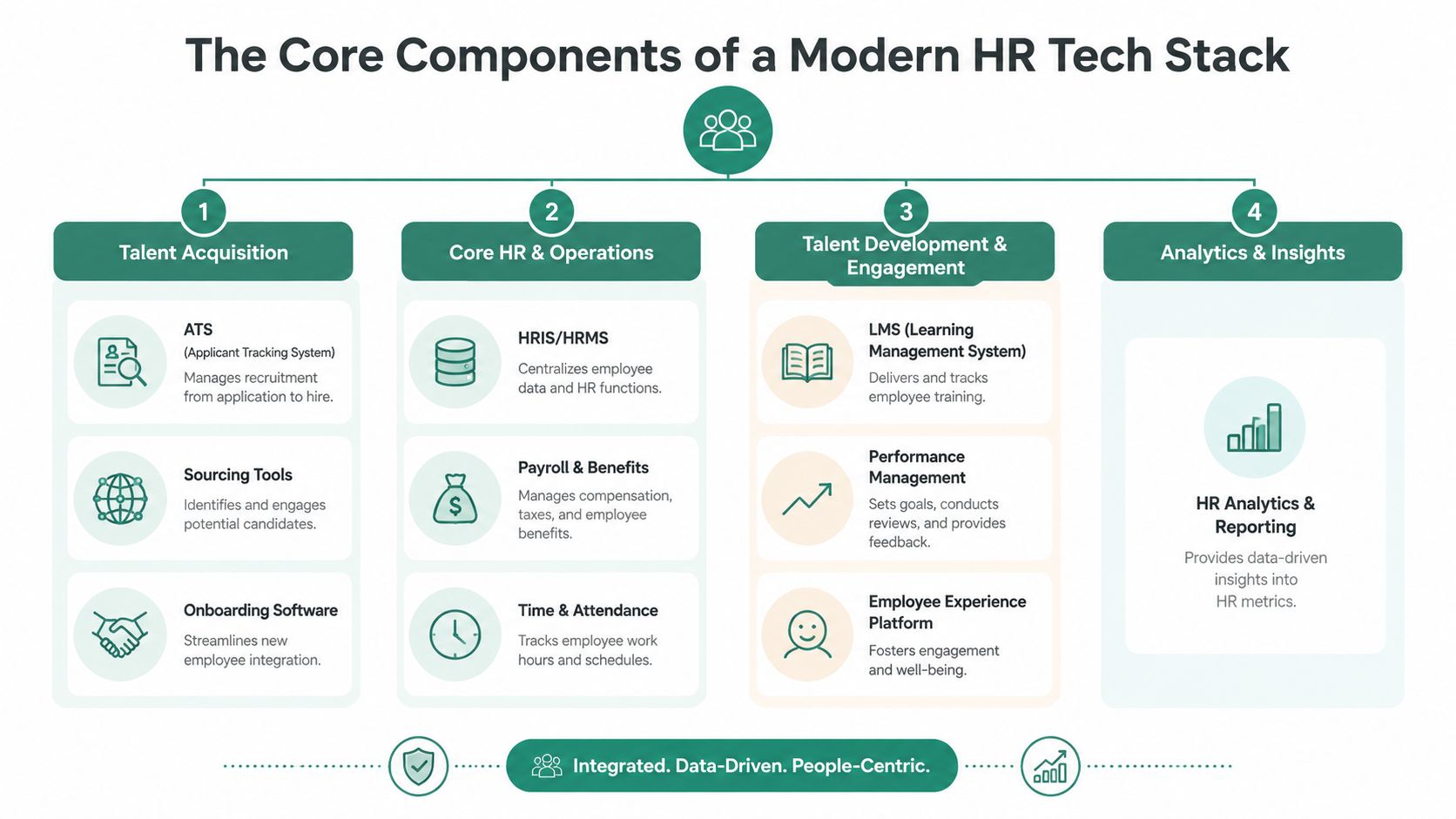
At the center is the HRIS or HRMS. In this system, employee identity, job data, organizational structure, and core employment records should live. If leadership can't answer “Which system is the source of truth for employee data?” the stack isn't ready to scale.
Core HR and operations usually include:
These systems tend to be less flashy than recruiting tools, but they carry more downstream consequence. Errors here create real operational problems.
Later in the evaluation process, it can help to review 10 top HR software picks to compare how different platforms package these core capabilities for smaller and growing teams.
Talent acquisition is often the first place companies add specialized software. That makes sense, because hiring teams feel process pain early.
This part of the stack commonly includes an ATS, sourcing tools, interview scheduling, and onboarding software. The ATS manages candidate progression. Sourcing tools expand the top of funnel. Scheduling reduces recruiter coordination work. Onboarding picks up the moment a candidate becomes a hire.
A second pillar covers development and engagement:
| Pillar | Typical tools | What they should accomplish |
|---|---|---|
| Talent acquisition | ATS, sourcing, scheduling, onboarding | Move candidates from interest to productive new hire |
| Talent development and engagement | LMS, performance management, employee experience tools | Build capability, document growth, and support retention |
The mistake I see most often is overinvesting in one pillar while neglecting the handoff points between them. A strong ATS doesn't fix weak onboarding. A polished LMS doesn't solve missing performance data.
Here's a useful walkthrough to pair with that mental model:
Analytics belongs above the operational systems, not trapped inside each one. Recruiting teams need funnel visibility. HR operations needs headcount and compliance views. Managers need performance and skills insight. Finance wants workforce reporting they can trust.
The best HR tech stack designs don't force leaders to choose between best-in-class workflows and usable reporting. They architect both.
That usually means defining what each tool is responsible for, then deciding where consolidated reporting will happen. If every tool reports on itself in isolation, leadership gets activity data instead of decision-grade insight.
Companies with disconnected HR systems spend more time reconciling records, correcting payroll inputs, and chasing status updates than leadership teams expect. In practice, integration quality often determines whether an HR tech stack reduces administrative work or spreads it across more systems.
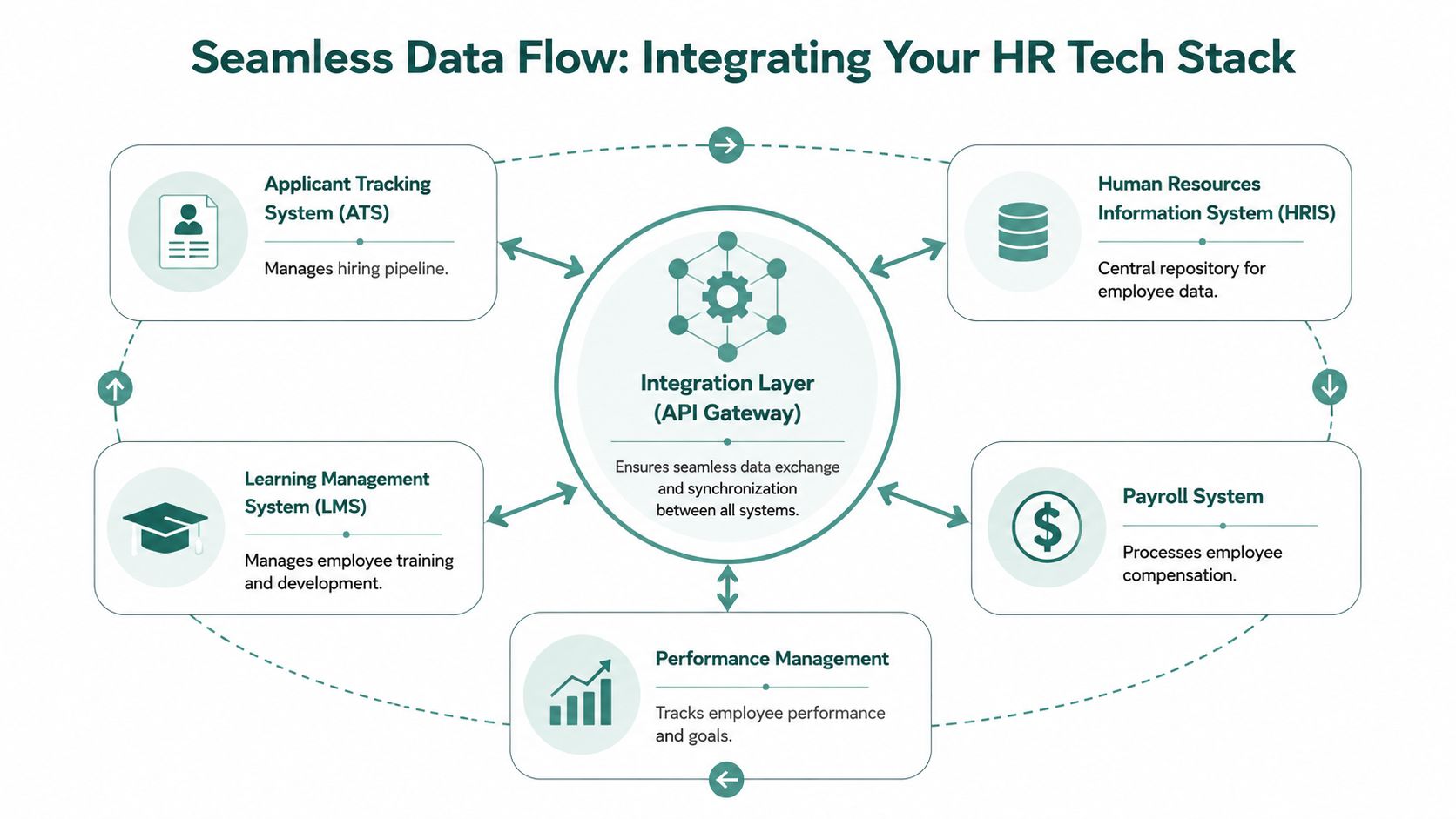
A strategic stack depends on data flow, not just feature coverage. An ATS, HRIS, payroll platform, LMS, and screening tools can each perform well on their own and still create friction if candidate, employee, and job data move inconsistently between systems.
That problem shows up early in the hiring process. Screening is a common failure point because it often sits between sourcing and formal applicant tracking, especially when teams use conversational tools, scheduling apps, or point solutions that were added quickly. If those tools are not tied into the rest of the stack, the business loses context right where speed and candidate experience matter most.
According to Eightfold's 2024 HR tech stack research report, poor API architecture and inconsistent data models create a 30–45% increase in manual data reconciliation effort and extend time-to-hire by 5–8 days. Stacks without unified data schemas also see 22% higher error rates in payroll and compliance reporting.
These are operating problems, not IT abstractions.
Well-run HR environments usually make four decisions early and document them clearly:
The conversational gap deserves special attention. Many companies now add chat-based screening, AI-assisted intake, or automated prequalification before a recruiter review. That can improve response rates and reduce recruiter workload, but only if the output writes back into the ATS in a structured way. If screening notes stay trapped in transcripts, inboxes, or vendor dashboards, recruiters lose visibility, hiring managers get partial information, and analytics become unreliable.
I usually tell leadership teams to review integrations by business event, not by vendor logo. A new applicant applies. A screening conversation is completed. A candidate is advanced. An offer is accepted. A worker is onboarded. At each point, ask three questions: what data should move, which system owns it, and what happens if the sync fails.
Here's a practical comparison for architecture reviews:
| Integration pattern | Works well when | Usually fails when |
|---|---|---|
| Native API connections | The stack uses mature platforms with stable endpoints and clear ownership | Field mapping is vague or each tool uses different definitions |
| iPaaS or middleware layer | You need to connect multiple systems and standardize orchestration | No one owns integration governance after implementation |
| Manual export and import | Transfers are infrequent and low risk | Hiring volume is high or workflows affect compliance, payroll, or candidate experience |
High-growth recruiting teams often feel this pressure first. This guide to recruiting software for staffing firms is a useful reference because staffing workflows expose integration weaknesses faster than lower-volume internal hiring models.
Watch for this symptom: If recruiters, coordinators, and HR operations keep asking which record is correct, the stack has a data ownership problem.
The strongest stacks are not just connected. They define how information moves across the hiring and employee lifecycle, including the handoff between conversational screening tools and core systems of record. That is what turns a functional stack into a strategic one.
Software demos can be misleading because they highlight polished screens, not operational friction. The right buying process starts with workflow design, then tests which vendor can support it cleanly over time.
Start with the hiring and employee lifecycle moments that create pain. That usually includes candidate intake, screening, scheduling, offer creation, onboarding, employee data changes, payroll handoff, performance reviews, and reporting.
Then ask a harder question. Where do teams currently leave the system and use email, spreadsheets, or shared documents? Those exits usually expose the actual requirements.
For recruiting-heavy organizations, this related guide on recruiting software for staffing firms is useful because it highlights how workflow complexity changes evaluation criteria when speed and coordination matter.
I recommend scoring each tool on a handful of dimensions, but not all with equal weight. A flashy interface shouldn't outrank integration quality if the business already struggles with fragmented systems.
Use this shortlist rubric:
A few trade-offs deserve direct attention:
| If you prioritize | You may give up | Why it matters |
|---|---|---|
| Broad all-in-one coverage | Some depth in specialized workflows | Simplicity helps, but only if the built-in process is good enough |
| Best-in-class point tools | More integration work | Specialization can pay off when a workflow is business-critical |
| Fast deployment | Configuration precision | Rushing setup often creates data cleanup later |
Buy for the process you want to run repeatedly, not the demo you saw once.
That mindset keeps teams from overvaluing surface-level features and undervaluing operational fit.
Early-stage screening is where many recruiting stacks still break down. The ATS collects applications, stores resumes, and tracks status changes, but too often it behaves like a passive database at the exact stage when candidates need real engagement.
Static application flows leave candidates waiting. Legacy ATS chatbots often make this worse because they can answer basic prompts but don't screen for fit, clarify interest, or move the process forward in a meaningful way.
Conversational Voice AI systems address a different part of the workflow. As described by Sense, these systems can automatically start screenings through outreach channels such as email, SMS, or WhatsApp and follow up when a candidate doesn't answer, which helps maintain engagement without constant recruiter intervention.
That matters because the first screening moment is no longer just about filtering applications. It's about keeping qualified people in motion while recruiters focus on judgment-heavy steps.
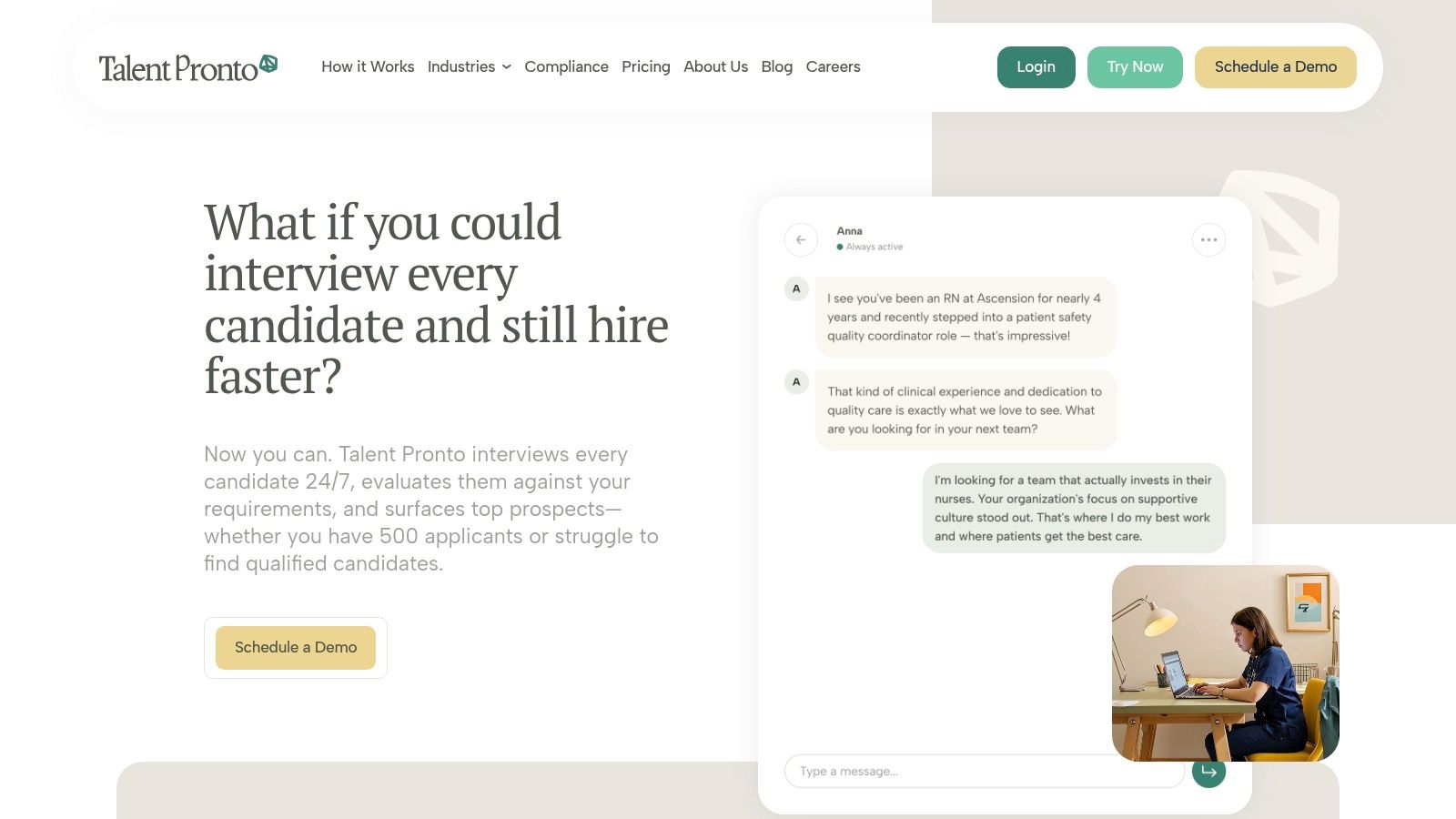
The gap between basic ATS chat and standalone screening platforms is practical, not theoretical. According to Cadient's guide to automated candidate screening, standalone conversational screening platforms outperform legacy ATS chatbots because they provide configurable calibration controls for tuning scoring and explicitly leave hiring advancement and rejection decisions to the employer rather than the AI system.
That distinction matters for governance. Good screening automation supports consistency. It shouldn't replace employer accountability.
A modern screening layer is strongest when it can:
For teams weighing architecture choices, this resource on choosing the best HR software is useful because it frames the trade-offs between bundled HR systems and more specialized components.
There's also growing interest in how screening design affects fairness and consistency. This discussion of how AI screening reduces bias in hiring is worth reviewing when your evaluation team is setting policy guardrails for automation.
Industry fit shows up fastest in workflow design. Two companies can buy the same ATS, CRM, scheduling tool, and screening layer, then get very different results because their hiring constraints live in different places. The difference is rarely the software category itself. It is the way data moves between systems, which fields get captured early, and whether recruiters and hiring managers can act on that data without extra handoffs.
In our experience, healthcare teams prioritize credential visibility, license verification status, role-specific knockout criteria, and speed from application to qualified shortlist. In high-volume healthcare settings, Atquo reports that automated conversational screening can reduce manual review time by 40–60% and accelerate identification of top prospects by 2–3 weeks. Those gains matter when open roles affect patient coverage, compliance exposure, and overtime costs.
Manufacturing teams usually need a different front-end filter set. Shift availability, transportation reliability, site preference, language support, and safety-sensitive requirements should be captured before recruiter review, then written back to the ATS in structured fields. If that information stays trapped in notes, inboxes, or call summaries, the stack creates delay instead of clarity.
This is also where integration discipline matters. A plant hiring workflow often breaks because screening data, interview scheduling, and local manager feedback sit in separate systems with no clean sync. Teams that treat talent pipeline management workflows as a data design problem, not just a sourcing problem, make better decisions faster.
Prioritize industry fit over category completeness. A broad platform that misses your actual constraints creates more admin work than a narrower stack configured around the decisions your team makes every day.
Retail and hospitality hiring puts pressure on response time, mobile completion rates, interview scheduling, and store-level handoffs. Candidates often apply from a phone and expect a quick answer. If the stack forces long forms, delayed follow-up, or unclear ownership between recruiting and location managers, candidate loss rises before anyone has assessed fit.
Tech hiring has a different failure mode. Applicant volume may be lower, but signal quality matters more. Teams need screening workflows that capture skill depth, project relevance, communication patterns, and hiring manager calibrations without forcing every applicant through the same generic path. Consequently, the conversational gap becomes paramount. Early screening has to collect richer context than a static form while still passing structured outputs back into the system of record.
A practical way to set priorities by sector is to ask which failure creates the biggest business cost:
That question usually clarifies which integrations, fields, and automations deserve budget first.
Implementation fails when leadership tries to modernize everything at once. The better approach is phased, governed, and tied to measurable outcomes. That reduces disruption and gives teams time to stabilize workflows before layering on more change.
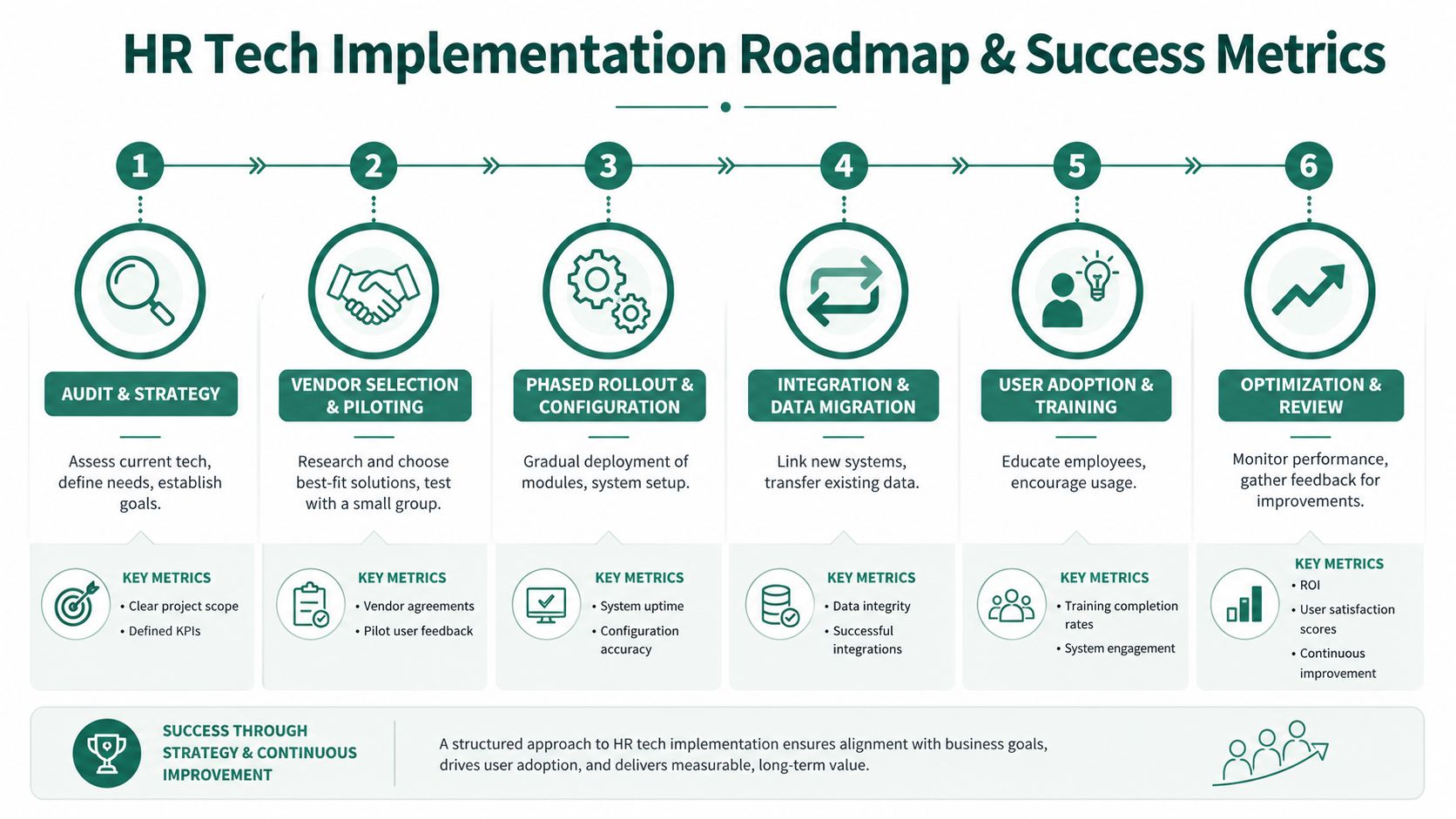
A practical roadmap looks like this:
For teams building stronger recruiting operations inside that roadmap, this guide to talent pipeline management can help shape how screening and stage progression should work across the funnel.
A new HR tech stack is only successful if operating metrics improve. The exact KPI set will vary, but leadership should insist on a concise scorecard tied to business outcomes.
Track metrics such as:
Don't measure success by implementation milestones alone. Measure whether the business now runs with less friction.
A stack should create cleaner decisions, fewer handoff errors, and a better experience for the people moving through it. If it doesn't, the technology may be live, but the transformation hasn't happened.
If your team wants to close the early-screening gap without forcing recruiters to review every applicant manually, Talent Pronto is worth a close look. Its AI-powered conversational screening helps employers engage applicants around the clock, ask role-specific behavioral and technical questions, produce structured scorecards, and sync with common ATS and HRIS platforms while leaving final hiring decisions in employer hands.

Talent Pronto is an AI-powered hiring platform built around Anna, our intelligent AI that conducts 24/7 conversational screening, evaluates candidates against specific job requirements and compliance needs, and schedules interviews. Run everything on the Talent Pronto ATS, our all-in-one applicant tracking system with a branded careers site and Anna built in, or keep your existing ATS and let Anna integrate with Greenhouse, Ashby, iCIMS, Jobvite, Lever, Oracle, and more. Either way, we help organizations reduce time-to-hire and build stronger teams.