Discover the best recruiting software for staffing firms in our 2026 guide. Includes key features, evaluation, ROI, & implementation.
A lot of staffing leaders are dealing with the same ugly pattern right now. Open roles keep coming in. Applications pile up fast. Recruiters spend the morning skimming resumes, the afternoon chasing candidates who already cooled off, and the evening updating systems that were supposed to save time.
The problem usually isn't applicant volume. It's operating model. A legacy ATS stores records after people apply. It doesn't actively move the funnel forward, qualify people at scale, or keep communication moving when recruiters are buried. That's why the conversation around recruiting software for staffing firms has changed. The core question isn't which database has the nicest interface. It's which platform helps your team engage every applicant, screen consistently, and get qualified people to interview before competitors do.
A staffing manager in healthcare or manufacturing usually doesn't need more resumes. They need fewer dead ends.
A common day looks like this. A client wants interviews fast. The job post attracts a flood of applicants, many of them loosely related to the role, some completely off target. Recruiters start triaging by keyword, send a batch of follow-ups, get pulled into client calls, then come back to an inbox full of missed replies and half-finished records. By the time someone identifies the strongest people, a few have already accepted another interview.
That bottleneck is bigger than individual productivity. A 2025 industry report covering 15,000 healthcare and manufacturing hiring managers found that 68% named high-volume applicant screening overload as their top operational bottleneck, and manual review of initial applications consumed an average of 14.5 hours per recruiter weekly before automated screening tools were deployed. That's a staffing operations problem, not just a recruiter time-management issue.
Most firms hit the same failure points:
The downstream cost isn't abstract. It shows up in missed submittals, slower fills, frustrated clients, and recruiters doing clerical work instead of revenue-generating work.
Practical rule: If your recruiters are acting like traffic controllers for inbound applications, your tech stack is too passive.
Modern recruiting software for staffing firms has to do more than capture records. It has to engage people immediately, collect structured information, and keep the process moving after hours. That shift matters even more in temp, contract, and high-turnover environments where speed and consistency decide whether a requisition is profitable.
There's also a basic operational truth many firms learn late. Faster screening creates pressure on downstream steps. If your offer letters and hiring paperwork still depend on manual document chasing, you replace one bottleneck with another. Teams tightening that handoff often also revisit tools for SignWith e-signature for HR so the back half of the process doesn't stall after the candidate says yes.
The strongest platforms now act less like filing cabinets and more like front-line recruiting infrastructure. They screen, answer candidate questions, score against role criteria, and tee up recruiter action when human judgment is essential.
That's the operating model shift firms should pay attention to. The market no longer rewards teams for building the biggest ATS database. It rewards teams that can turn incoming interest into qualified, interview-ready candidates without wasting recruiter hours on first-pass sorting.
A staffing platform used to be judged on search, notes, and pipeline stages. That's no longer enough. If a product mainly stores candidate records and lets recruiters search them later, it's still a database, even if the vendor wrapped it in new branding.
The new standard is proactive engagement. Good recruiting software for staffing firms should contact applicants immediately, guide them through screening on web or mobile, collect comparable answers, and route the right people to recruiters with useful context attached.
That means the platform needs to do seven things well:
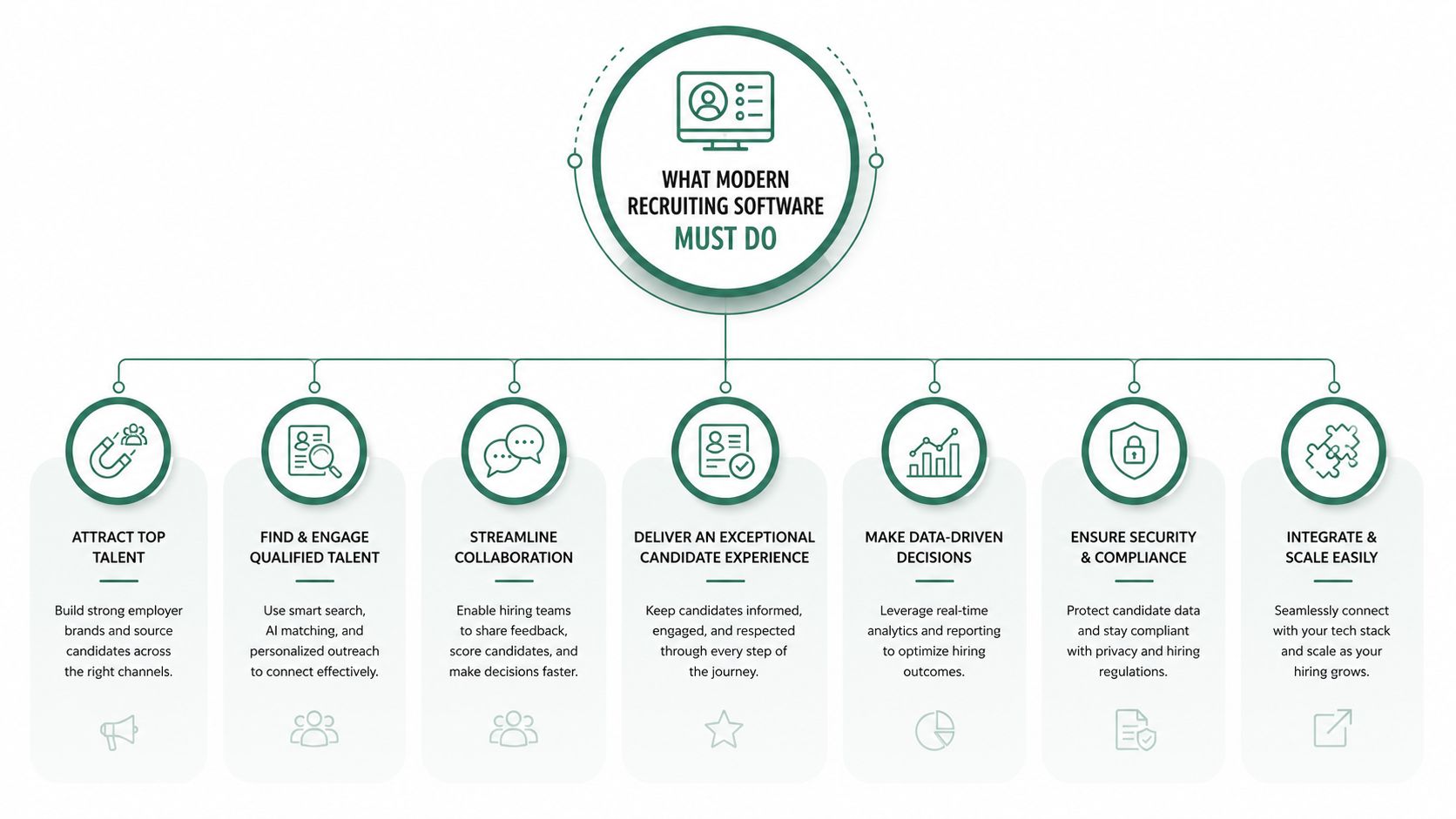
A lot of tools claim they do this. Many only automate form collection.
Keyword matching is still useful for basic filtering, but it misses too much. A warehouse lead moving into logistics coordination, a military medic moving into healthcare support, or a manufacturing technician with adjacent safety certifications can all be invisible to a rigid search setup.
That's why semantic analysis matters. Advanced staffing recruiting platforms use LLMs for semantic resume parsing with a 94% accuracy rate in identifying transferable skills, compared with 68% for traditional keyword-based matching. They also reduce time-to-screen for high-volume roles by an average of 72 minutes per 1,000 applicants. That fact comes from the verified data set provided for this topic.
The practical takeaway is simple. Modern systems read for context, not just exact phrasing. They can connect non-identical job titles, infer relevant adjacent experience, and reduce the number of qualified people who get buried because their resume doesn't mirror the requisition language.
A search box finds words. A modern screening platform should find fit.
For firms hiring into specialized or regulated roles, that difference matters even more. Generic ATS logic struggles when the role depends on nuanced experience, licensing signals, or behavioral indicators that don't show up in a standard keyword search. Such scenarios highlight the importance of role-specific screening, and specialized screening for complex roles is a better model than relying on generic ATS filters.
When I evaluate vendors, I look for operational behavior, not feature lists. The questions are practical:
| Capability | What good looks like | What usually fails |
|---|---|---|
| Screening | Conversational, role-specific, available after hours | Static knockout forms |
| Scoring | Structured rubric with evidence | Black-box score with no explanation |
| Candidate experience | Mobile-friendly, clear next steps, fast responses | Delayed follow-up and repeated data entry |
| Recruiter workflow | Shortlist with context and recommended action | Recruiter still reads everything manually |
| Integration | Two-way sync with status discipline | CSV exports and duplicate records |
The best systems don't replace recruiter judgment. They protect it. Recruiters should spend their time validating edge cases, pitching candidates, and managing client expectations. They shouldn't spend most of the day figuring out who deserves an initial screen.
That's the core shift. The software isn't there to archive recruiting activity after the fact. It's there to perform the earliest, highest-volume work with consistency so your team can move faster without getting sloppier.
Buying software gets expensive when firms mistake feature availability for operational fit. A vendor demo can make almost anything look smooth for fifteen minutes. The true test is whether the platform works inside your process, your compliance environment, and your client delivery model.
Start here, because weak integration ruins adoption.
If your recruiters have to update the new tool and then re-key the same information into Bullhorn, Greenhouse, Workday, ADP, or another system of record, usage drops fast. Good integration means candidate records, statuses, notes, scheduling outcomes, and scorecards move cleanly between systems without manual cleanup.
Ask vendors to show the exact workflow. Don't accept “we integrate with Workday” as an answer. Ask what syncs, how often it syncs, and where exceptions appear. A lot of tools have a connector. Fewer have a dependable process.
Use this short checklist during evaluation:
The compliance conversation often gets pushed to legal late in the process. That's a mistake. In staffing, compliance isn't a side concern. It affects client trust, public-sector eligibility, and how defensible your process is when someone questions a rejection.
The benchmark worth paying attention to is this: the U.S. Department of Labor's 2024 Fair Hiring Audit Report found that organizations using uniform screening protocols with documented scorecards and clear criteria achieved a 53% higher rate of audit compliance and a 28% reduction in bias-related legal challenges than organizations using traditional resume-only screening methods.
That tells you what to look for:
If a vendor can't explain how its scorecards are built, you're not buying intelligence. You're buying uncertainty.
For healthcare and government-related staffing, push harder. Ask how the system handles accommodations, role-specific criteria, and audit review. A fast workflow that creates defensibility problems isn't efficient. It's risky.
A small firm and a multi-vertical staffing organization don't need the same setup. But both need software that can adapt to different client requirements without turning every new requisition into a configuration project.
Look at three things together.
First, customization. Can the platform support different screening paths for warehouse associates, nurses, customer support agents, and licensed specialists? Second, scalability. Will it hold up when applicant volumes spike or when you add new locations and recruiters? Third, usability. Can a recruiter understand what the system is recommending without clicking through five screens?
A useful way to grade vendors is to score them in four categories:
| Category | What to test | Red flag |
|---|---|---|
| Integration | Live sync with ATS and HRIS | One-way export only |
| Compliance | Structured, documented scorecards | Unclear scoring logic |
| Customization | Role-based screening flows | One generic template |
| User experience | Fast recruiter review and mobile candidate flow | Recruiters need workarounds |
Some platforms impress operations leaders and frustrate recruiters. Others feel easy to use but break under client-specific complexity. You need both. The right tool should reduce recruiter friction while making your process more consistent, not less.
The easiest way to judge recruiting software for staffing firms is to look at the bottleneck first, then the workflow change. Features matter. Operational relief matters more.
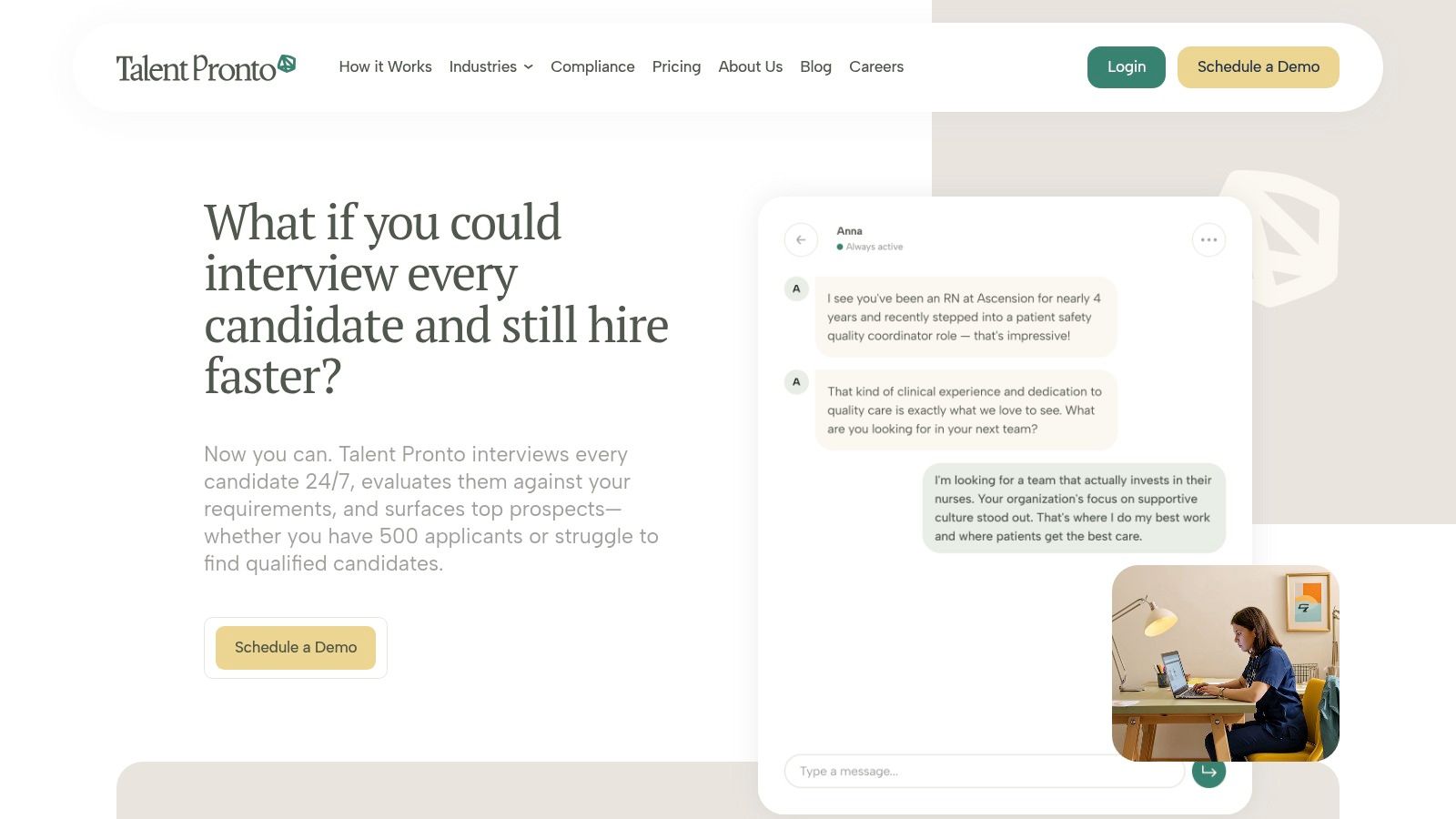
Near the opening of a real evaluation, I want teams to look at the product in action, not just in slides.
Take a staffing firm supporting a hospitality or retail client with constant hourly hiring. The old process is predictable. Hundreds of applicants enter quickly. Recruiters skim resumes, call a subset, leave voicemails, and lose time to no-shows and scheduling lag.
A proactive screening platform changes the order of work. Every applicant gets immediate engagement. The system asks role-specific questions, captures availability, checks basic fit, and prepares a structured summary for recruiter review. Recruiters don't start with raw applications. They start with organized signal.
An agentic screening tool makes sense. One example is Talent Pronto, which conducts conversational screening, ranks applicants against role-specific criteria, prepares structured scorecards, and syncs with common ATS and HRIS platforms. Used correctly, software like this becomes the first layer of qualification, not just a record-keeping tool.
The candidate side matters too. A 2025 study found that mobile-friendly conversational engagement flows increased candidate completion rates for next-step interviews by 37% and reduced drop-off caused by scheduling delays by 29%. In high-volume staffing, that's not a nice-to-have. It directly affects how many qualified people reach interview.
Now change the scenario. The client isn't filling twenty similar shifts. They need a harder-to-find healthcare, technical, or specialist profile. The applicant count is lower, but the risk of delay is higher because strong candidates disappear fast.
In that case, the value of modern software isn't mass filtering alone. It's immediate conversion. The platform can respond after hours, answer common candidate questions consistently, collect detailed screening input, and trigger scheduling as soon as someone clears the initial threshold. That shortens the gap between candidate interest and recruiter contact.
A quick walkthrough helps teams visualize what that looks like in practice:
Slow follow-up is expensive in niche recruiting because the people you want usually have options before your recruiter reaches them.
The important point across both cases is this. Automation works when it removes delay from the earliest stage and hands recruiters a tighter queue. It fails when it adds another inbox, another dashboard, or another score nobody trusts. Good software reduces first-pass work. Bad software just relocates it.
Most staffing software failures aren't product failures. They're rollout failures. The platform gets purchased, configured too broadly, introduced too fast, and then bypassed by recruiters who stick with email, spreadsheets, and whatever notes system already works for them.
The better approach is narrower and more disciplined. Pick one role family, one team, or one client segment where screening overload is obvious. Build the workflow there first. Confirm the question set, scoring rubric, status mapping, and recruiter handoff before expanding.
That phased approach matters because early mistakes are easier to fix when the blast radius is small. It also gives operations leaders something more credible than a promise. They can show a live workflow, real recruiter feedback, and real exception handling.
This rollout sequence is the one I recommend most often:
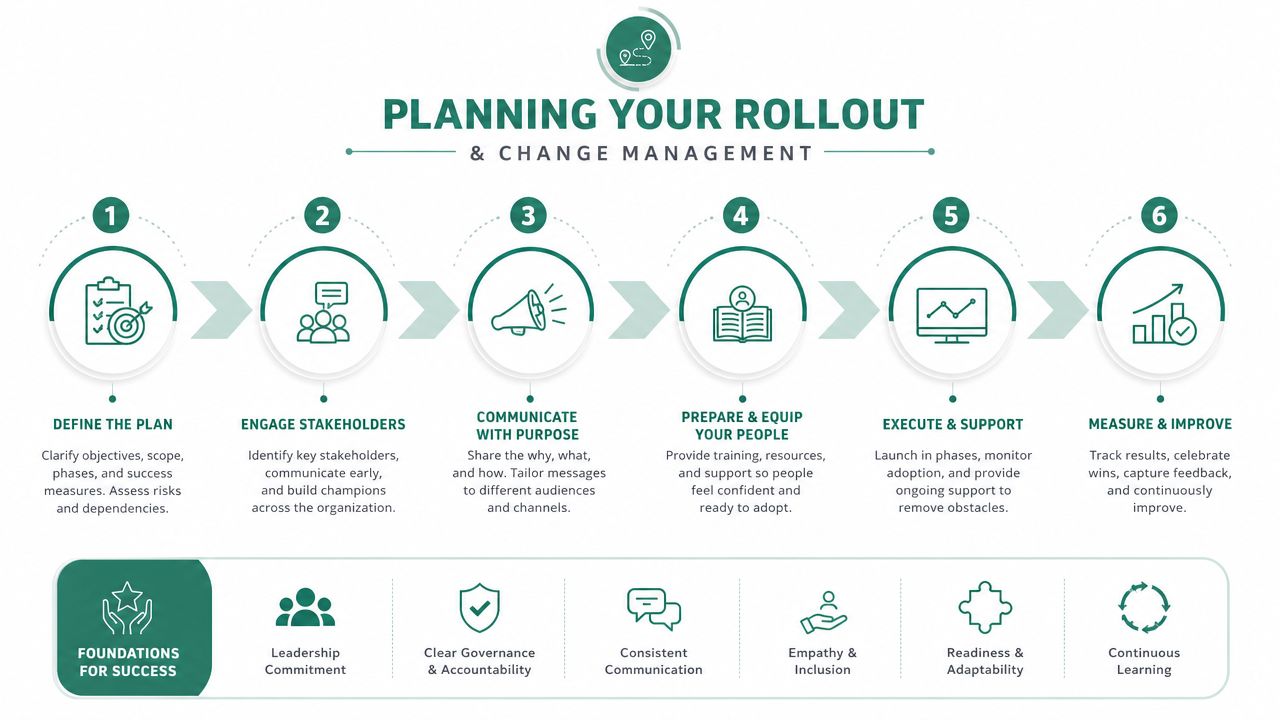
For teams that want a more detailed rollout model, this practical guide for HR teams implementing AI tools is a useful reference point because it focuses on workflow adoption, not just setup.
The fastest way to lose recruiter buy-in is to frame automation like replacement. Experienced recruiters already know where the process breaks. They need to see how the system removes repetitive work and sharpens their decisions.
Training should center on three questions:
Don't overtrain on menus. Train on operational decisions. Show recruiters how to review scorecards, override where appropriate, and spot weak matches quickly. If they understand the logic, they'll use the tool. If they only know where the buttons are, they'll abandon it when a messy case appears.
The rollout doesn't end at launch. The first month usually exposes question wording issues, weak criteria, integration gaps, and candidate experience problems that no demo environment catches.
Set a simple weekly review during the pilot:
| Review area | What to examine |
|---|---|
| Candidate flow | Where candidates stall or abandon |
| Recruiter trust | Which scores or recommendations they dispute |
| Data sync | Missing fields, status conflicts, duplicates |
| Client fit | Whether screened candidates match submission expectations |
Launch the smallest version that can produce a real recruiter queue. Then improve it with live evidence.
That's how change sticks in staffing. Not through broad internal messaging. Through a workflow that recruiters find easier than the old one.
Staffing leaders get in trouble when they approve software on general promises like efficiency or better hiring. Those claims are too vague to defend six months later. You need a before-and-after operating picture tied to measurable outcomes.
Start by pulling a baseline from the previous hiring period for the same role types or client segments. Don't compare retail hourly hiring to executive search. Keep the comparison clean.
The most useful staffing metrics are usually:
A lot of teams also track outreach effectiveness. If your process includes texting or calling candidates at scale, it helps to understand response quality by channel. Teams refining that part of the funnel often look at guidance on optimizing SMS and voice campaigns so communication performance is measured, not guessed.
The strongest ROI story connects one workflow change to one business result.
For example, structured behavioral screening should reduce inconsistency in who gets advanced. It should also make recruiter reviews faster because evidence is easier to compare. That expectation is supported by verified data: independent analysis found that structured, criteria-based behavioral questioning reduced early-stage evaluation inconsistency by 42% and decreased bias-related compliance exposure by 31% across healthcare, manufacturing, and retail hiring teams.
Use that logic in your business case:
| Capability | KPI to watch | Why it matters |
|---|---|---|
| Structured screening | Screening time, interview conversion | Recruiters review fewer weak fits |
| Documented scorecards | Audit readiness, dispute handling | Decisions are easier to defend |
| Mobile-friendly engagement | Candidate completion, drop-off | More applicants reach the next step |
| ATS sync and automation | Admin time, data accuracy | Recruiters spend less time updating systems |
If finance wants ROI, connect the labor shift to recruiter capacity and fill velocity. If operations wants proof, show fewer hours spent on first-pass review. If clients want evidence, show stronger shortlists and faster turnaround.
For firms comparing investment options, it helps to review the Talent Pronto pricing structure alongside internal estimates of recruiter time, role volume, and expected process savings. The point isn't the subscription line item by itself. It's whether the software changes the unit economics of filling roles.
Vendor demos are designed to make every platform look capable. Your job is to find out what breaks under real staffing conditions.
Start by avoiding lazy questions. “Do you use AI?” tells you almost nothing. Most vendors will say yes. The better questions expose process quality, integration depth, and whether the platform can hold up under client scrutiny.
Ask questions that force specifics:
| Category | Question | Notes |
|---|---|---|
| Screening logic | How are role-specific questions created and updated for different job families? | Look for examples, not theory. |
| Score transparency | Show us a completed scorecard and explain how each answer maps to criteria. | If they can't show reasoning, expect recruiter distrust. |
| Compliance | How do you support uniform screening, documentation, and review for regulated environments? | Push on healthcare and public-sector scenarios if relevant. |
| Human oversight | What decisions does the system automate, and what decisions stay with the employer? | Final hiring decisions should remain with humans. |
| Integration | Which ATS and HRIS fields sync bi-directionally, and how are conflicts handled? | Ask for status mapping detail. |
| Candidate experience | What does screening look like on mobile, after hours, and for candidates who need an alternative path? | Watch for friction and accessibility gaps. |
| Reporting | Which funnel reports come standard, and which require services or custom work? | Hidden reporting costs add up. |
| Implementation | What does the rollout sequence look like in the first month? | Vague answers usually mean weak onboarding. |
| Support model | Who helps tune workflows after launch? | Adoption drops when support ends after implementation. |
| Scalability | How does the system perform across multiple clients, role types, and recruiter teams? | Make them address your operating reality. |
A few questions are especially good at cutting through polished sales language:
Buy the platform your recruiters can trust under pressure, not the one that sounds smartest in a demo.
The firms that make better software decisions usually ask narrower questions. They want to know how the tool behaves at 9 p.m. when candidates apply, during a surge week when requisitions spike, and in the awkward cases where a score looks wrong but the recruiter sees potential. That's where the product's quality is revealed.
If your team is trying to move from passive ATS record-keeping to active, criteria-based screening, Talent Pronto is worth evaluating as part of that shift. It handles conversational screening, structured scorecards, candidate engagement, and ATS or HRIS coordination while leaving final hiring decisions with the employer.

Talent Pronto is an AI-powered hiring platform built around Anna, our intelligent AI that conducts 24/7 conversational screening, evaluates candidates against specific job requirements and compliance needs, and schedules interviews. Run everything on the Talent Pronto ATS, our all-in-one applicant tracking system with a branded careers site and Anna built in, or keep your existing ATS and let Anna integrate with Greenhouse, Ashby, iCIMS, Jobvite, Lever, Oracle, and more. Either way, we help organizations reduce time-to-hire and build stronger teams.