Learn how conversational AI works, from intent detection and dialog management to generative models, plus how it screens candidates 24/7.
At 11:47 PM on a Tuesday, a lot of job applications happen in a familiar state. The laptop is half-closed, your phone is in your hand, and you finally have ten quiet minutes to finish a form you've been putting off. You expect the usual dead end: submit, wait, maybe hear back in a few days.
Instead, a chat window opens and starts talking back.
That moment is a good way to understand how Conversational AI works. Not in the abstract, but in the exact place people encounter it now: a live conversation that feels immediate, slightly human, and a little mysterious. Under that smooth surface, though, the system isn't doing one thing. It's passing each message through a stack of components, some rule-driven and auditable, others statistical and flexible.
In hiring, that boundary matters. A system may be good at asking the next question, formatting a reply, or booking a time slot. That doesn't mean it should make a judgment about a person on its own. Keeping those layers separate is the difference between useful automation and sloppy automation.
Maya is a project manager in Phoenix. She's scrolling on her phone after work, finishes reading a listing, and taps Apply.

A chat window appears instead of a long form.
The first message says: “Hi Maya. You're applying for Project Manager. Can you confirm that's the role you want to continue with?”
She types: “Yes.”
A second message arrives almost immediately: “Thanks. What's your current notice period?”
She types: “Two weeks.”
Then the third question lands: “What salary range are you targeting for your next role?”
She pauses there.
Not because she doesn't know the answer, but because this question changes the feel of the interaction. A second ago, this seemed like digital paperwork. Now it feels like she's already in a screening conversation. She types, deletes, retypes, then finally sends: “Looking for something in the 95k to 110k range depending on benefits.”
Nothing Maya saw was magic. Every sentence she read and every word she typed moved through the same basic pipeline:
The easiest way to read a chatbot is to stop asking, “Is it intelligent?” and start asking, “Which component produced this specific message?”
That question gets especially important in hiring. Confirming the role is one kind of task. Asking a candidate to describe a project is another. Scheduling an interview is different again. Those actions may happen in one chat window, but they rely on different machinery underneath.
A conversational system behaves more like a small team sitting behind the chat box, each with a different job.
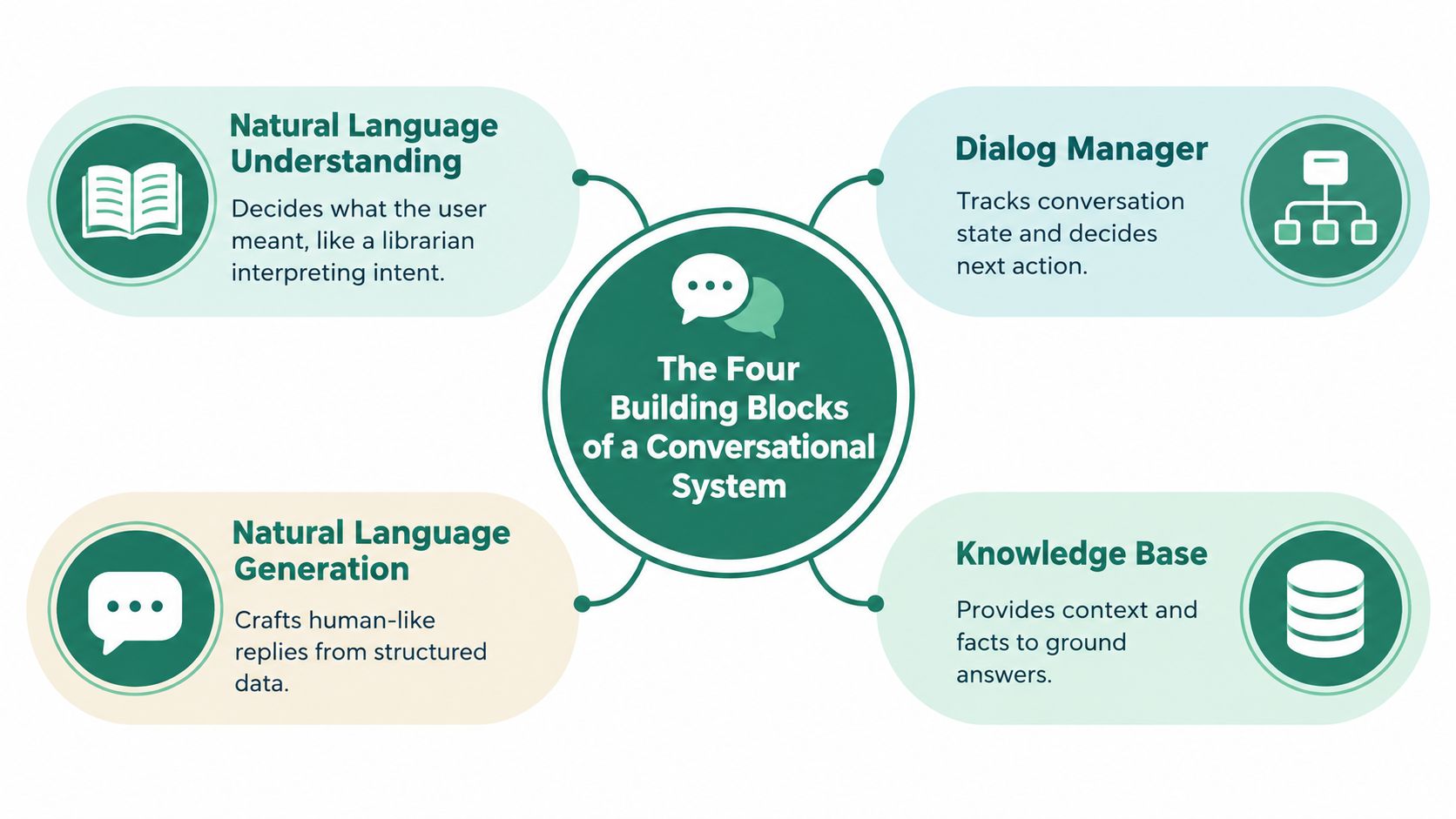
Start with natural language understanding, usually shortened to NLU.
Think of it as a librarian reading a scribbled request card. The handwriting is messy, the wording is casual, and sometimes the person asking doesn't use the official term. The librarian still has to decide what the request means and file it under the right topic.
If Maya writes “two weeks,” NLU maps that answer to a concept like notice period. If she writes “I can start after my current sprint wraps,” NLU still tries to place that answer in the same bucket.
In the Maya exchange, this is the component interpreting her reply, not the one deciding whether two weeks is acceptable.
Next is dialog management.
This is the staff member who remembers what's already been asked and decides what happens next. It tracks the conversation state. In a hiring flow, that state often includes things like job ID, location, notice period, eligibility answers, and whether the candidate already completed a question.
If the system has already confirmed the role, it shouldn't ask again. If salary range is still missing, it may ask a follow-up. If the candidate says, “I meant the senior PM role,” the dialog manager has to update the state and steer the conversation accordingly.
For teams building these systems, especially globally distributed ones, it helps to understand the actual engineering work involved. If you need that perspective, this guide on how to hire conversational AI engineers in LATAM is useful because it frames the stack as integration and workflow design, not just model access.
Then comes response generation.
This is the writer. It takes a system decision and turns it into a sentence a human can read. Sometimes that sentence is fully templated, such as “Thanks. What's your current notice period?” Other times a model drafts a more flexible response based on context.
That distinction matters. A templated reply is predictable. A generated reply is more natural, but it also carries more variation.
In Maya's case, the polite wording of the message likely came from this layer.
The fourth block is the one people often miss: the context layer.
Think of it as the notebook on the desk. It stores session memory, policy rules, retrieved documents, and any facts the system needs to avoid answering from memory alone. In newer systems, this layer often includes retrieval from trusted documents before a model drafts a reply. Manning's explanation of retrieval-augmented generation captures the core idea well: the system first retrieves relevant passages, then sends both the user's question and those passages to the model so the answer is grounded in external evidence.
For Maya, this notebook is where the system keeps “Project Manager,” “two weeks,” and her salary range so the next turn doesn't forget them.
If you want the shortest useful answer to how Conversational AI works, it's this: a message travels through a pipeline. The system doesn't “just answer.” It breaks input apart, interprets it, checks state, fetches context, drafts a reply, and then applies controls before anything is sent back.
Here's the six-step version using Maya's salary message.
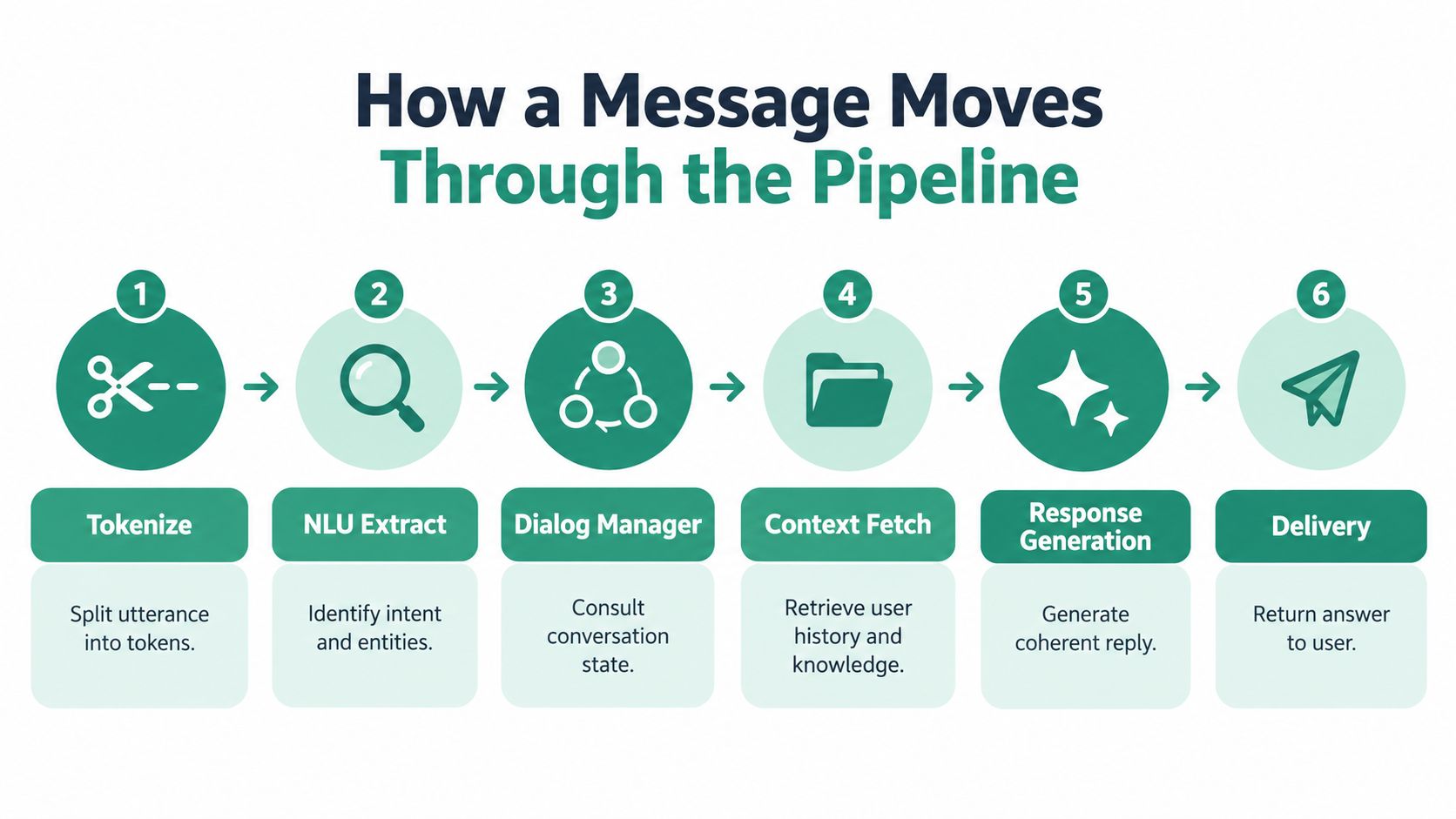
Tokenize the utterance
Maya types, “Looking for something in the 95k to 110k range depending on benefits.” The system splits that text into smaller units called tokens. This step is mostly mechanical. It's a preprocessing task, so it's largely deterministic.
Run language understanding
The system tries to infer intent and extract entities. In this case, it may tag the answer as a salary expectation and pull out the range. This step is usually probabilistic because the model is making a best estimate from language patterns.
Consult the dialog manager
The conversation logic checks the current state. Was salary asked? Is a value still missing? Does the answer satisfy the expected format? This layer often mixes both worlds. The state check is deterministic. Interpreting an ambiguous answer can involve probabilistic scoring.
Fetch required context
The system may check the job record, compensation band, geography, or employer policy. Data lookup itself is deterministic. Choosing which context is relevant can involve probabilistic retrieval in more advanced systems.
A plain-language walkthrough of AI assistant mechanics also lives in this explainer on how AI assistants work, especially if you want a broader view beyond hiring.
The visual below helps if you prefer seeing the flow before reading more detail.
Generate the response
Once the system has enough structure, it drafts the next message. If the salary answer fits expectations, it might send a simple confirmation and move on. If the value is vague, it may ask a clarifying question. Free-text drafting is usually probabilistic. A hardcoded sentence template is deterministic.
Apply post-processing and safety checks
Before delivery, systems often validate tone, remove prohibited wording, enforce policy, or trigger escalation. These checks are usually the most deterministic part of the stack because they rely on rules, allowlists, logging, and explicit workflow controls.
The confusion usually comes from treating the whole conversation as one kind of intelligence. It isn't.
Practical rule: If a vendor promises certainty, ask which step is deterministic and which step is probabilistic.
That's the line buyers should care about. Deterministic parts are what teams can reliably govern. Probabilistic parts are what teams need to monitor, test, and constrain.
The biggest jump in conversational quality didn't come from better canned scripts. It came from a new model architecture. The modern foundation shifted decisively in 2017 with the Transformer architecture introduced in “Attention Is All You Need,” published on June 12, 2017. The paper replaced recurrence with self-attention, which let systems process language in parallel rather than only step by step. That made large language models practical and improved scalability. The first published Transformer was an encoder-decoder model with about 100 million parameters in its original form, and it became a defining milestone in natural language processing, as outlined in the Transformer paper summary.
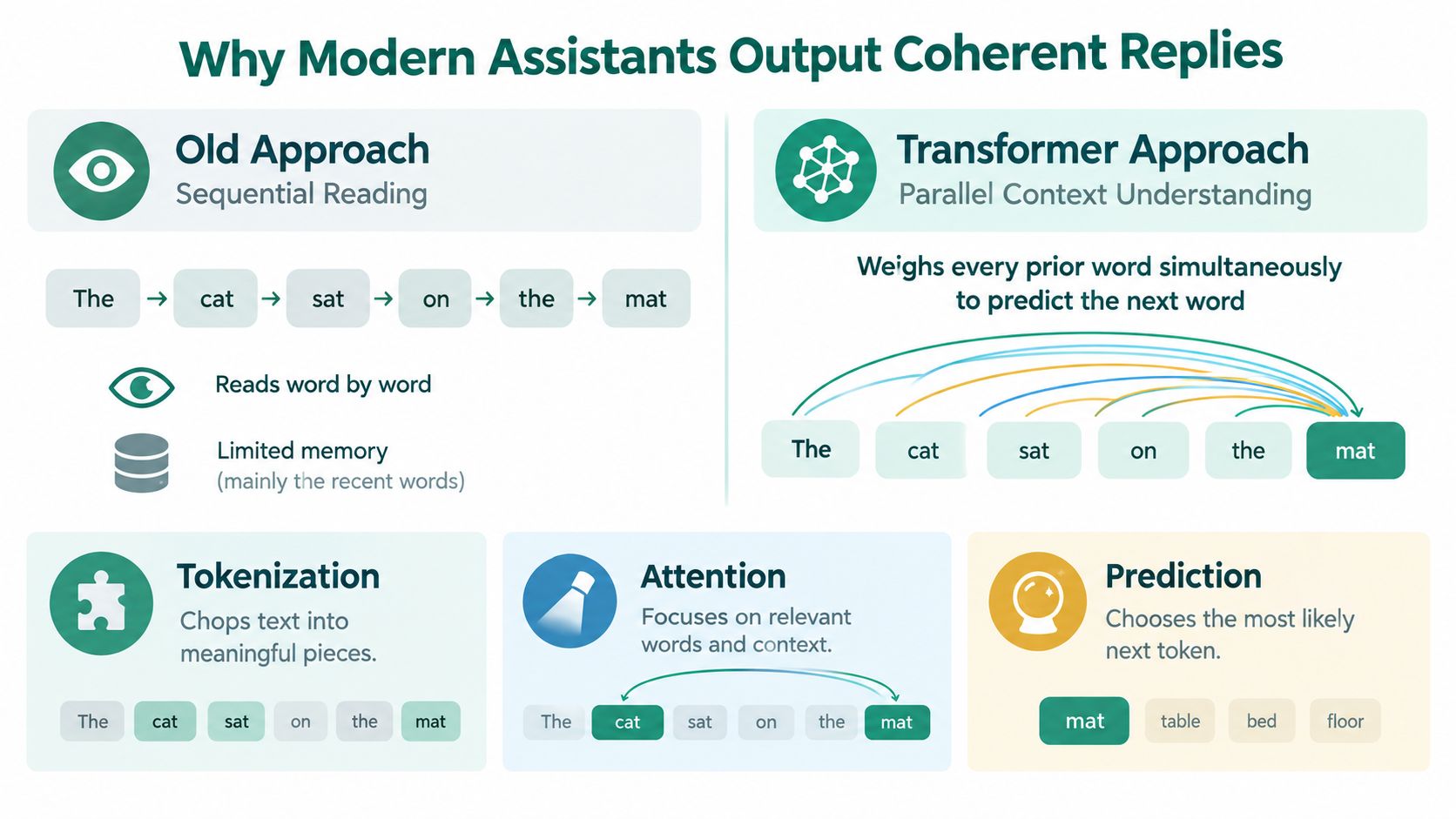
A simple analogy helps. Older systems were like a reader moving one word at a time with a weak memory of what came earlier. Transformer-based systems act more like a reader who can look across the whole sentence, weigh which earlier words matter most, and then predict the most likely next token.
That's why replies often feel smoother. The model isn't only reacting to the last phrase. It can weigh the whole visible context.
The mechanics are still simple at a high level:
This is also where many readers mix up two different things: sounding coherent and being correct.
A model can produce fluent language from its learned parameters alone. But for high-stakes tasks, teams increasingly add retrieval before generation. In a retrieval-grounded setup, the system searches trusted documents and passes relevant passages into the generation step so the answer is anchored to evidence, not just memory.
Industry coverage also shows that production systems are moving beyond old intent trees toward orchestration layers that combine LLMs, NLU, context management, tool calling, and guardrails. That shift is described in Renascence's analysis of what actually works in 2026. The important takeaway isn't that chat got smarter on its own. It's that useful systems separate what the model writes from what the workflow controls.
Fluent language is not the same thing as trustworthy workflow.
That's the answer to why modern assistants sound coherent. Better language modeling made the conversation smoother. External context, tools, and guardrails make the conversation usable.
Candidate screening is a good test case because it contains both safe automation and risky judgment in the same interaction. One message might confirm logistics. The next might appear to evaluate a person.
Here's a continuous version of Maya's conversation.
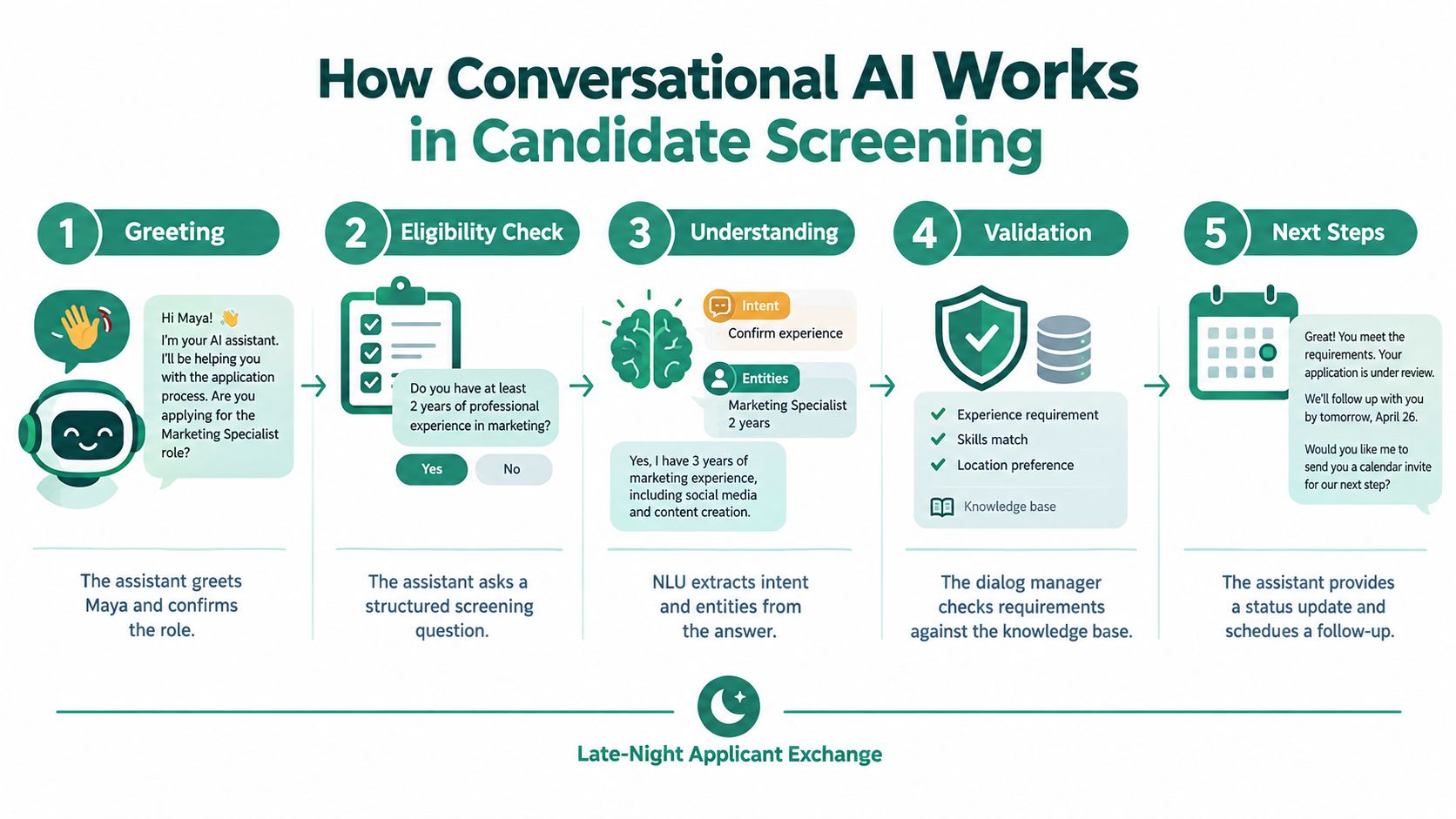
The assistant greets Maya, confirms the role, and asks whether she's legally eligible to work in the relevant location. That part is highly structured. The system maps her answer into a fixed category, stores it, and checks whether the workflow can continue.
Then it asks about a past project.
Maya types a short description of a rollout she led across multiple teams. At this point, the system may extract entities, note keywords related to scope or ownership, and use the conversation state to decide what evidence is still missing. A decent follow-up isn't “tell me more” in the abstract. It's something like asking what constraint she had to manage, what metric she used, or how she handled cross-functional conflict.
That follow-up is where the stack can look smarter than it really is. The model may generate polished wording, but the work is split:
A walkthrough of automated candidate screening makes this distinction clearer. Systems can automate the flow of screening very effectively, but that doesn't mean every generated sentence is itself an evaluation.
This is the line worth drawing carefully.
Formatting the conversation includes greeting, rewording questions, acknowledging answers, and presenting available interview times. Those tasks move the interaction forward, but they don't meaningfully judge the candidate.
Evaluating the candidate starts when the system compares answers against a rubric, flags missing evidence, or routes the transcript for review based on fit signals. Structured interview scorecards are useful here because they keep questions, rating scales, and evidence fields consistent and auditable, as described in this guide to structured interview scorecards.
Scheduling is even cleaner. If Maya qualifies for the next step, the assistant shouldn't invent time slots. It should call a calendar or ATS tool and return actual availability. That's a deterministic action, not a creative one.
Talent Pronto is one example of this pattern. Its assistant conducts conversational screening, asks role-specific questions, and prepares structured scorecards for human review rather than making final hiring decisions on its own.
Behavioral evaluation remains the softest part of the stack.
An answer like “I led a difficult launch” sounds strong, but the system can't verify the claim from text alone. It can probe for specifics. It can compare the response with a rubric. It can route the case if confidence is low or if a flagged phrase requires recruiter attention. But it shouldn't be confused with ground truth.
That's why hiring systems work best when they separate conversation orchestration from human judgment. One keeps the process moving at any hour. The other stays accountable for decisions about people.
The biggest mistake buyers make is assuming that a smooth conversation means a sound evaluation. In hiring, that leap is risky.
A 2025 occupational-bias study found that all tested AI chatbots showed some degree of bias in occupational recommendations by race and gender, according to the Springer article on occupational bias in AI chatbots. That doesn't mean every conversational screening tool behaves the same way, but it does mean fairness can't be assumed just because the interface sounds neutral.
There's also a candidate experience problem. Independent reporting cited in industry coverage found that 30% of candidates dropped out after learning an interview was AI-led, while another cited figure said 38% had walked out of a hiring process because of an AI interview, as summarized in MetaIntro's coverage of AI interview dropout. If people distrust the process, always-on availability won't rescue the funnel by itself.
| Failure Mode | Pipeline Stage Affected | Representative Finding |
|---|---|---|
| Bias in recommendations or interpretation | Understanding and evaluation layers | Tested chatbots showed some degree of occupational bias by race and gender |
| Candidate distrust and abandonment | User experience and workflow design | Reported dropout and walkout behavior after candidates learned AI was conducting interviews |
| Overreliance on self-reported answers | Evaluation layer | Text chat can collect claims, but it can't verify actual past performance on its own |
| Hallucinated wording or invented policy details | Response generation | A fluent answer can still be unsupported if it isn't grounded in trusted data |
| Weak handling of emotion or unusual phrasing | Understanding and routing | Candidates may sound frustrated, guarded, or indirect in ways the system parses poorly |
Some limitations are more basic than bias.
A candidate can use AI coaching while answering. A model can mirror confident language and mistake style for substance. A polished reply can hide weak evidence. And a text channel, by itself, can't verify whether someone led the project they describe.
Governance helps, but only if teams treat it as mandatory. A practical hiring policy should include notice, consent where required, reasonable accommodations, adverse-impact testing, explainable logic, and logging of routing decisions, as outlined in this AI screening compliance guide. For a more formal internal control posture, teams also need a written AI governance policy for hiring workflows.
The technology is strong at orchestration and weak at judgment.
That sentence is the simplest way to keep expectations realistic. Conversational AI is excellent at collecting, routing, formatting, and scheduling. It still needs disciplined oversight when people start treating it like an evaluator.
When vendors demo a conversational product, they usually show the smoothest part first: a clean chat that answers quickly and sounds polished. That's the easiest part to fake. A better evaluation checks the stack layer by layer.
Language understanding
Ask for real transcript handling, not demo phrases. Can the system deal with vague, messy, corrected answers? This category is emerging to mature, depending on domain constraints.
Dialog management
Watch what happens across multiple turns. Does the system remember what was answered, recover from interruptions, and hand off clearly when it should? This area is often mature when the workflow is narrow and structured.
Generation quality
A fluent answer isn't enough. Ask how the system stays grounded, where it retrieves facts from, and what happens when it doesn't know. This category is emerging because language quality is high but reliability still depends on design choices around prompts, retrieval, and guardrails.
Integration maturity
Can it write to calendars, ATS records, ticketing systems, or HRIS platforms with logs? Or does it only talk about those actions? This category is either mature or marketing-only. There isn't much middle ground.
Governance
Ask about bias testing cadence, versioning of prompts and scorecards, retention rules, candidate transparency, opt-out paths, and whether qualified applicants can ever be auto-rejected without human review. A practical AI recruiting guide recommends written scorecard and prompt versioning, periodic audits of rejected versus advanced profiles, transparency when AI is used, and a rule that no sole-model auto-reject should happen for qualified applicants without human review, as laid out in this AI recruiting governance guide.
Use these prompts in a fifteen-minute vendor demo:
If you want a buyer's shortcut, don't score the chat experience first. Score the controls first. The strongest conversational systems aren't the ones that feel most human. They're the ones that make their boundaries visible.
Talent Pronto offers an AI hiring assistant that conducts conversational screening, asks role-specific questions, prepares structured scorecards, and supports recruiter review rather than replacing it. If you're evaluating hiring workflows through the lens of deterministic controls, grounded responses, and accountable human oversight, visit Talent Pronto to see how that model is applied in practice.

Talent Pronto is an AI-powered hiring platform built around Anna, our intelligent AI that conducts 24/7 conversational screening, evaluates candidates against specific job requirements and compliance needs, and schedules interviews. Run everything on the Talent Pronto ATS, our all-in-one applicant tracking system with a branded careers site and Anna built in, or keep your existing ATS and let Anna integrate with Greenhouse, Ashby, iCIMS, Jobvite, Lever, Oracle, and more. Either way, we help organizations reduce time-to-hire and build stronger teams.