Learn how do AI assistants work behind the scenes, from intent recognition and retrieval to scoring rubrics and ATS integrations that power modern hiring.
A candidate submits a nursing application at 11:47 PM, and the first follow-up lands before anyone on your recruiting team has checked their inbox. The assistant asks about patient experience, shift flexibility, and availability for an interview, then routes the next step without a recruiter typing a single message. That's the moment most hiring leaders realize the surface conversation isn't the actual system. The visible chat is only the front end of a much larger pipeline.
The same pattern shows up in hiring teams that need speed without losing structure. A well-built assistant doesn't just greet people, it captures input, figures out intent, pulls the right context, generates a response, and can even trigger actions in connected software. Databricks describes that sequence as user input capture, intent recognition and context parsing, data retrieval and knowledge grounding, response generation, and action execution or output delivery, with a feedback loop that improves accuracy from corrections and usage patterns, and that's why browse smart assistant integrations matters as a practical topic, not a technical footnote.
When people ask how do AI assistants work, they're usually picturing a chatbot that types back a polite answer. That's too small. In hiring, the actual value comes from the orchestration layer, the part that connects language understanding to ATS updates, interview scheduling, rubric-based scoring, and other work that normally sits behind a recruiter's desk. That hidden layer is what turns conversation into workflow.
A midnight screening chat feels simple from the candidate's side. They answer a few questions, get a follow-up about clinical experience, and leave with an interview time on the calendar. On the hiring side, though, that single exchange has already touched intake logic, role criteria, scheduling rules, and status changes in a system the recruiter may never see directly.
The assistant's answer is the end product, not the mechanism. Databricks describes modern assistants as a sequence of input capture, intent recognition, retrieval, response generation, and action execution, and that sequence explains why they can do more than chat, they can summarize documents, create SQL queries, or trigger workflows when the system is configured to do so. The underlying idea is simple, even if the implementation isn't. The assistant reads the message, works out what it means, checks the right context, and then decides whether to reply, ask a follow-up, or perform an action.
That's the mental model hiring leaders need. A candidate asking about night shifts, for example, isn't just asking a general question. The assistant has to decide whether to answer from employer-provided information, route to scheduling, or score the response against the role's criteria. Speaknotes describes that same foundation as a pipeline that turns language into machine-usable form, fetches the right context, generates a response, and sometimes takes action in another tool, which is why the conversation feels conversational even when it's doing operational work.
The visible chat is the front door, the real work happens behind the wall.
Hiring teams don't need a prettier inbox. They need a system that can interpret messy human language and connect it to business systems without losing the meaning of the exchange. A candidate might ask about weekend availability, wage expectations, or whether a credential is required for a specific site. The assistant has to handle that variation without flattening every answer into a form field.
That's where modern assistants differ from older scripted tools. They combine natural-language processing, retrieval, and generation, which lets them handle open-ended requests while staying grounded in enterprise data or external knowledge sources when available. For hiring leaders, that means the assistant can keep the interaction fluid while still being tied to the employer's rules, benefits, and workflow logic.
If you want a mental shortcut, think of the assistant as a relay team. One runner grabs the message, the next interprets it, the next fetches the right facts, and the last one delivers the result to the hiring stack. The candidate only sees the handoff at the finish line.
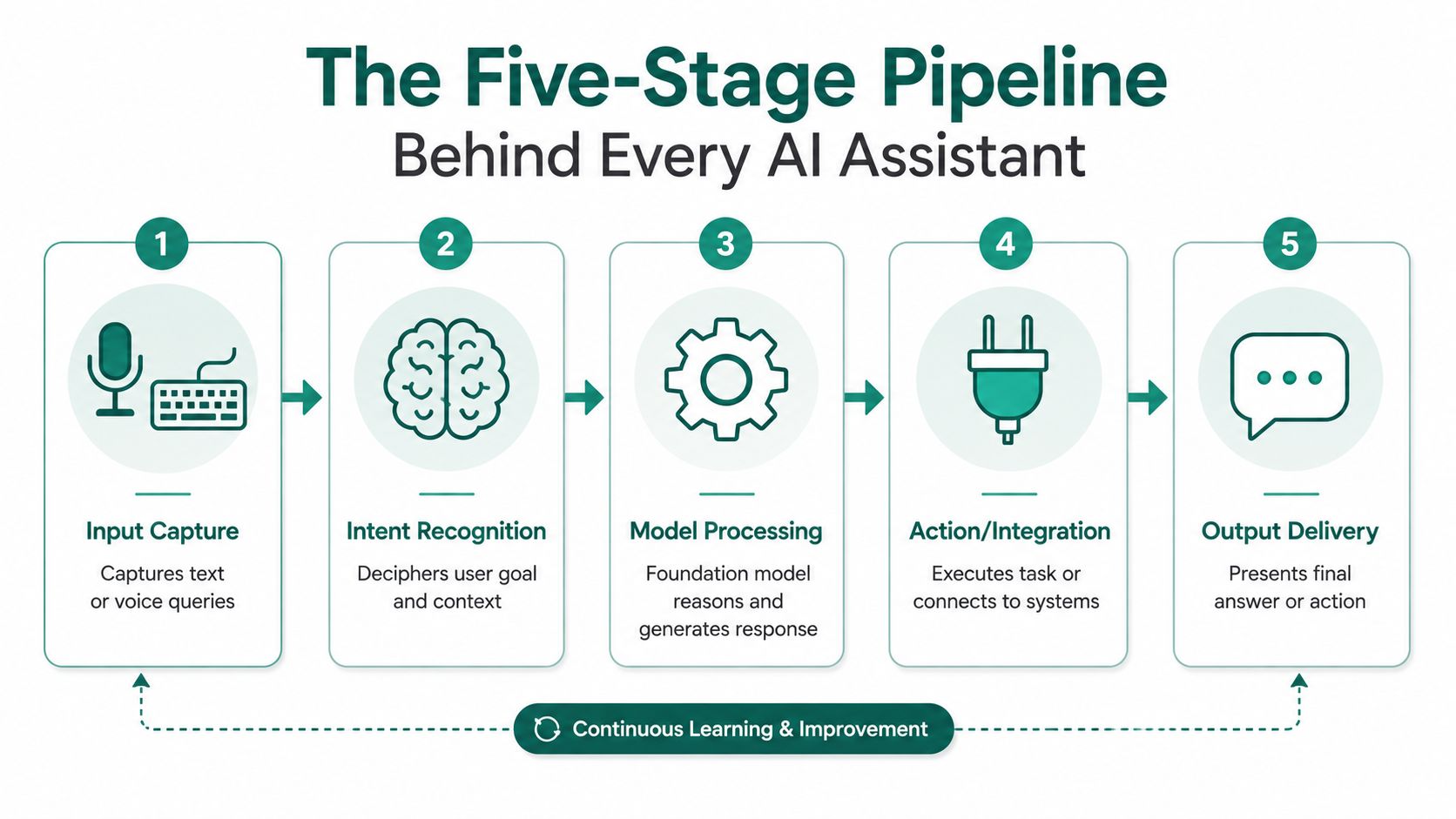
A hiring assistant turns raw text or speech into action by moving through five stages. Zemith's technical guide describes the same core architecture, user input is captured and normalized, orchestration decides whether to answer directly or call tools, and the response may trigger an external action. That structure is what makes the assistant useful in a recruiting workflow instead of just conversational. It is the part that connects language understanding to real business work, such as ATS updates, interview scheduling, and rubric-based scoring.
The first job is to collect what the candidate said, whether that came in through text or voice. Akamai's glossary notes that AI assistants rely on speech recognition to convert spoken words into text, which matters when a candidate is answering from a phone during a commute or filling out a screening from a mobile browser. Once the input is in a clean form, the rest of the pipeline can work on it consistently.
The assistant then figures out what the person is trying to do. Are they asking about shift flexibility, answering a behavioral question, or requesting a start date? Natural language processing does the heavy lifting, because the same sentence can carry different meanings depending on the role and the surrounding context. If the assistant misreads the intent, every later step gets weaker.
Retrieval and knowledge grounding keep the assistant from floating into generic answers. A hospital can feed it shift differentials and compliance rules, while a manufacturer can ground it in safety certification requirements. The assistant uses that context to answer accurately instead of guessing. That is the difference between a useful screening tool and a fluent but unreliable chatbot.
Workflow orchestration matters here too. An assistant can interpret a candidate's answer correctly and still fail if it cannot hand that information to the right system, which is why teams looking at talent pipeline management need to pay attention to what happens between the conversation and the next hiring step.
The model then drafts a reply in natural language. IBM notes that many assistants are powered by foundation models, especially large language models, but they are usually augmented with retrieval, memory, and API integrations for practical usefulness, because the LLM provides fluent reasoning while the add-ons ground answers and enable action. In hiring, that means the response can sound human while still staying tied to the job requirements.
The last step is where the conversation becomes work. The assistant might update the ATS, schedule an interview, generate a scorecard, or send the next question. That is the stage most explainers skip, but it is the part hiring teams buy. Without that connection, the assistant is just generating text rather than functioning as a hiring tool.
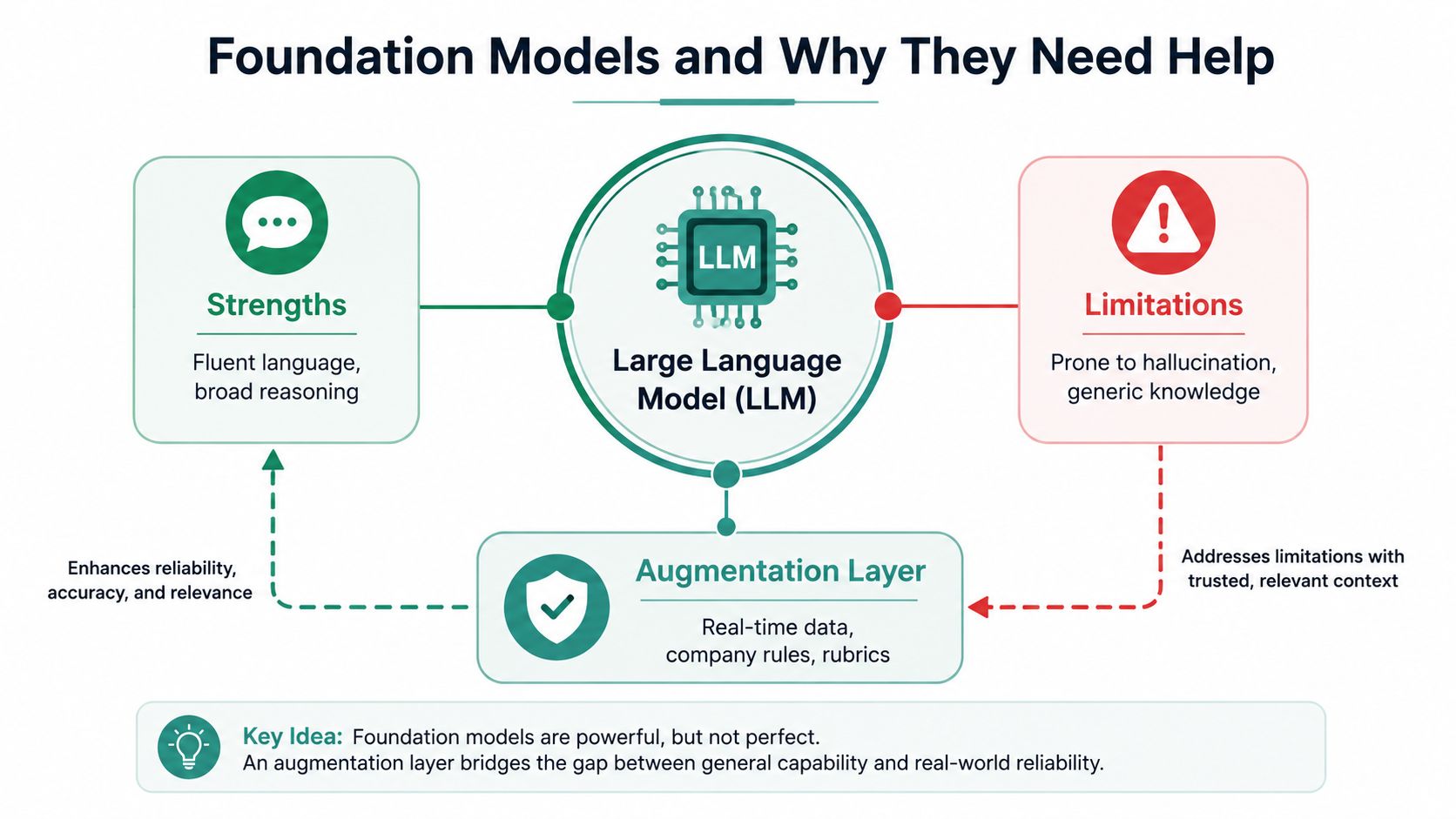
A foundation model is the language engine at the center of the system. It predicts and generates text well, but on its own it doesn't know your hiring policy, your role rubric, or which interview slot is open. IBM's framing is useful here, the model gives fluency, but retrieval, memory, and integrations make it useful in production. Without those pieces, the assistant is much more likely to drift into generic conversation.
Large language models are strong at drafting, summarizing, and rephrasing. They can turn a candidate's messy answer into readable prose, or help the assistant ask a cleaner follow-up question. That fluency is essential because candidates don't speak in structured form fields. They talk about their experience in fragments, side stories, and half-finished thoughts.
The model also helps the assistant keep the interaction natural. A rigid system might ask for one answer and stop. A stronger system can reflect the candidate's wording, ask a clarification question, and keep the exchange moving without sounding scripted. That's important in hiring, where tone affects completion rates and candidate trust.
A bare model doesn't reliably know current facts. It doesn't know your benefits package, your shift rules, or whether a certification is required in a specific state unless that information is supplied through retrieval or a connected system. That's why “just an LLM” is never enough for hiring workflows. The model can write the answer, but it can't verify the answer unless the rest of the stack supplies the truth.
Memory adds another layer. A persistent assistant can remember the active conversation and, in some systems, the candidate's earlier interactions so it doesn't ask the same question twice. Integrations do the final job, because the assistant still needs a calendar, an ATS, or an HRIS to take a real action. It operates like a brilliant new hire who knows language perfectly but still needs the company handbook, the login credentials, and the calendar before they can do the job.
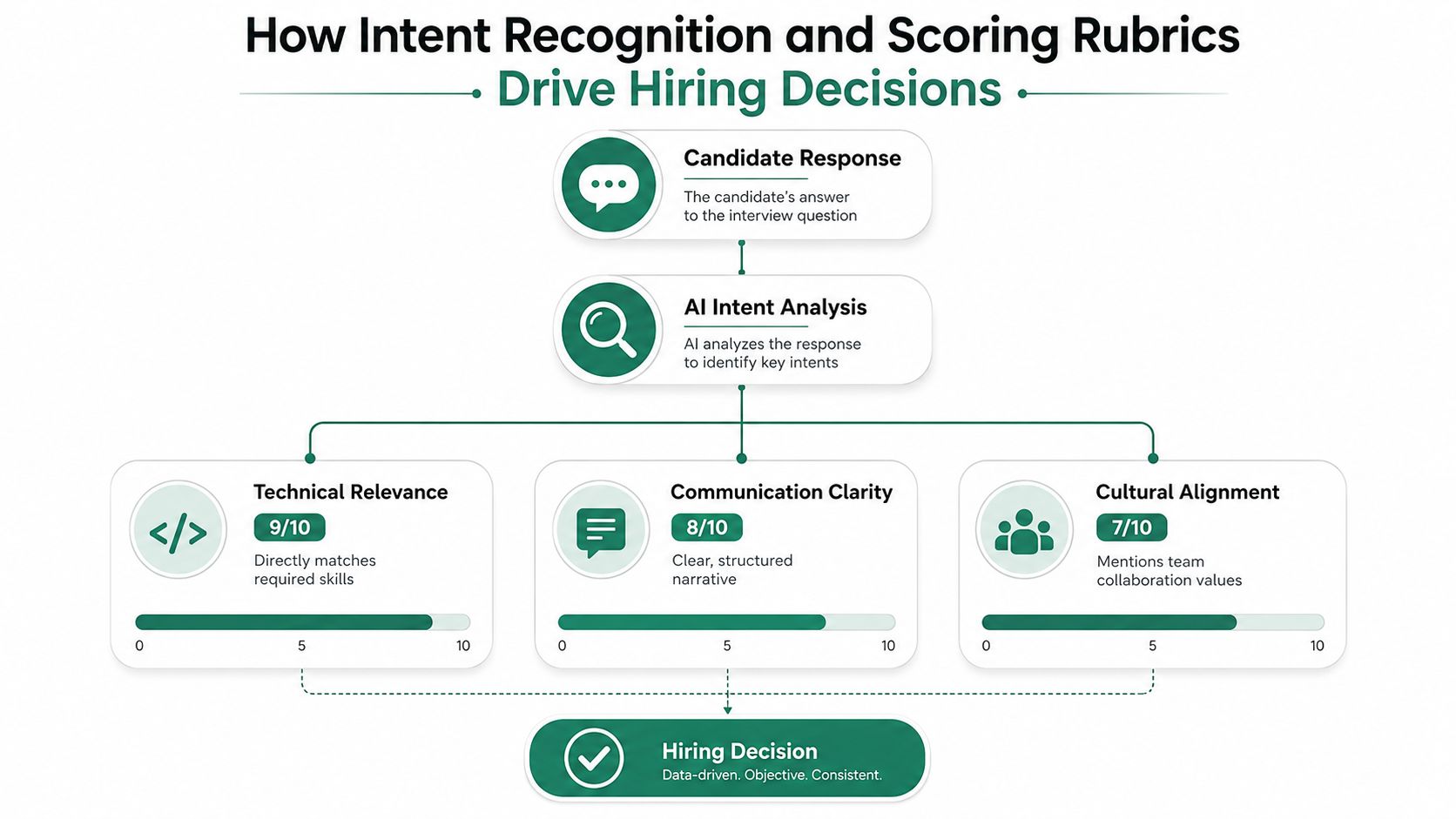
Intent recognition matters because candidates don't answer in neat checkboxes. One person may describe leadership experience through a story about covering a shift crisis, while another talks about teamwork by explaining how they trained a new colleague. The assistant has to read those answers for meaning, not just keywords. That's what separates a screening conversation from a form fill.
Entity extraction pulls out the parts of the answer that can be compared, things like years of experience, certifications, shift preferences, or references to team leadership. Once those pieces are structured, the assistant can map them to the job's criteria. That makes the screening more consistent because the same kind of detail gets measured the same way across applicants.
A retail manager screening is a good example. If a candidate describes a customer conflict, the assistant doesn't just note that a conflict happened. It looks for how the candidate handled the situation, whether they stayed calm, and whether their answer fits the scoring rubric the employer defined for customer service, availability, and conflict resolution.
Rubrics turn conversation into evidence. Instead of a recruiter relying on memory or impression, the system produces a scorecard tied to the role. Talent Pronto's platform uses conversational screening with structured scorecards and role-specific criteria, which is one way this idea appears in practice. The principle is broader than any one tool, though. The important part is that every candidate gets measured against the same standard.
That makes comparisons easier across large applicant pools. It also gives hiring teams something auditable, because the score comes with the reasoning behind it rather than a vague “good fit” label. If you're training interviewers or designing your own rubric, training the interviewer is really about making those criteria explicit before the conversation starts.
A good rubric doesn't replace judgment, it makes judgment visible.
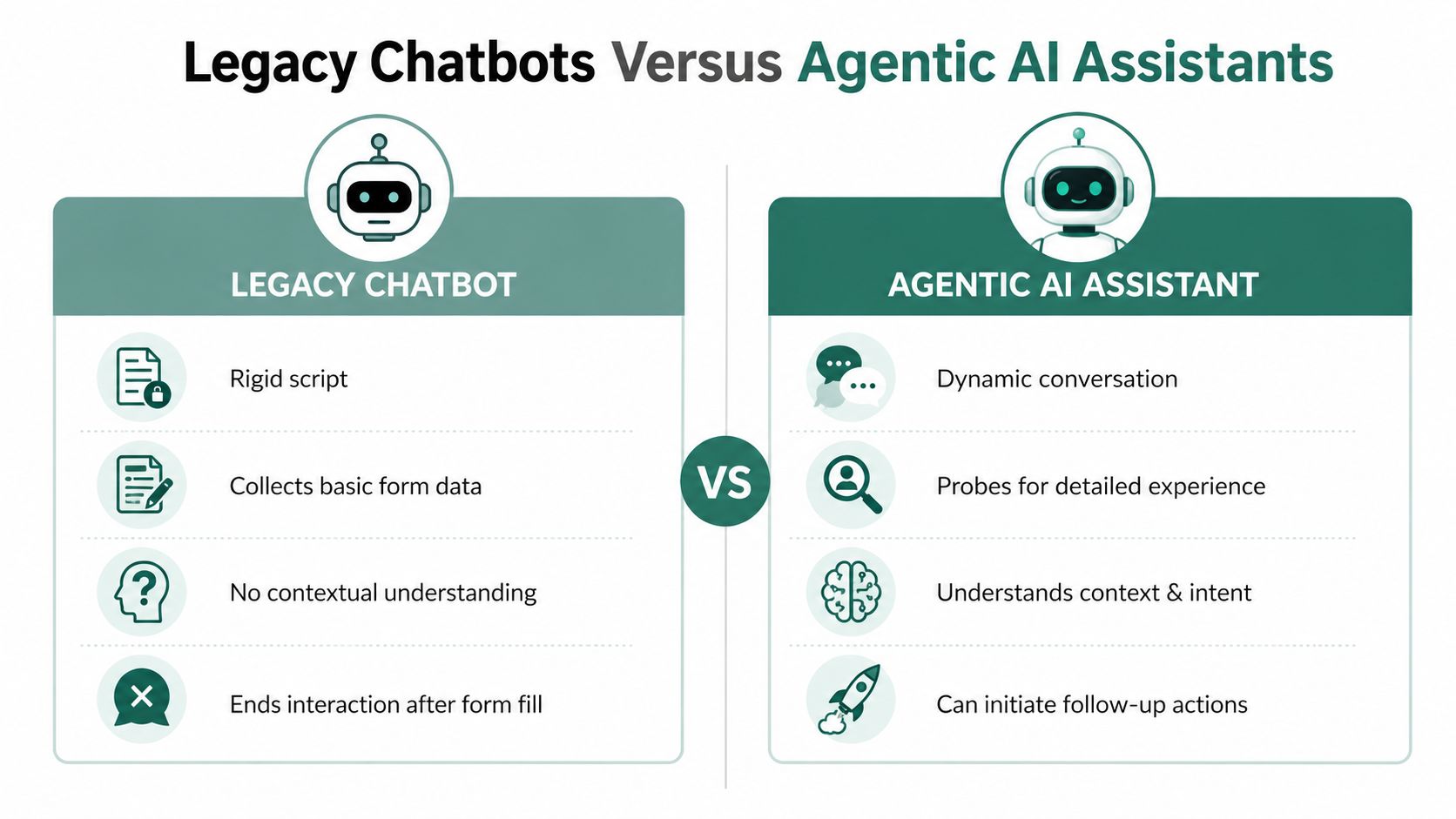
Legacy chatbots and modern AI assistants often look similar at first glance. Both live in the candidate journey, both respond in real time, and both can sit inside an application flow. The difference shows up as soon as the conversation stops following a script.
Traditional ATS chatbots usually collected basic fields like name, email, and availability. They worked through rigid decision trees, which meant they were fine for intake but weak at understanding context. If a candidate gave a nuanced answer, the chatbot often ignored the nuance and pushed them back to the same narrow path.
Agentic assistants do more than collect form data. They probe experience, ask follow-up behavioral questions, adapt to what the candidate says, and can initiate follow-up actions like scheduling or ATS updates. They also support industry-specific screening in areas like healthcare, manufacturing, retail, hospitality, government, and tech, where the questions need to match the role rather than the generic application form.
The architectural difference is the point. A chatbot ends after the form is filled. An assistant keeps working. That means employers can use the same channel for screening, clarification, coordination, and reporting, without forcing candidates to move between disconnected tools. The result is not just a smoother conversation, it's a more complete workflow.
| Capability | Legacy ATS Chatbot | Agentic AI Assistant |
|---|---|---|
| Core interaction | Rigid script | Dynamic conversation |
| Candidate understanding | Minimal context | Reads intent and follow-ups |
| Screening depth | Basic fields | Probes experience and behavior |
| Workflow action | Stops after intake | Can initiate scheduling and updates |
| Role calibration | Generic | Criteria-based and role-specific |
If you're comparing vendors, the question isn't whether the tool can chat. It's whether it can think through a workflow and move the hiring process forward without losing control of the criteria.
Hiring leaders are right to ask whether AI assistants can be trusted in people-facing decisions. They can help, but only when the system is designed to reduce harm instead of automate it. The risk isn't just bad output, it's the quiet repetition of old patterns at scale.
A poorly designed assistant can mirror historical bias, hide its reasoning, or create a process that leaves certain candidates behind. It can also become harder to challenge if the screening logic is opaque. Van Comm's discussion of underserved communities points to the need for diversity, transparency, and lived experience in system design, because automation without those controls can reproduce inequities.
That's why public-sector, healthcare, and other high-stakes hiring environments need more than an attractive interface. They need evidence that the screening criteria are applied consistently and that the process can be reviewed later. If candidates can't understand how a decision path works, your team will struggle to defend it.
The safest systems use uniform screening criteria, documented scorecards, and transparent processes that can be audited. They also give candidates a path to opt out if they prefer a traditional application route. That matters because fairness isn't only about the model, it's about process design, candidate experience, and the ability to explain what happened.
For teams focused on adverse impact, what adverse impact means in hiring is a useful starting point because it forces the right questions early. Ask vendors how they test for bias, what gets logged, who can review the scorecards, and how they handle exceptions. If the answers are vague, the system is not ready for high-stakes use.
A hiring assistant is easiest to deploy when you treat it like a workflow change, not a software install. Talent Pronto's product materials describe typical implementation in 1 to 3 weeks, with ATS and HRIS integrations that sync candidate data and statuses so recruiters don't retype the same information into multiple systems. That kind of integration is the operational win, because duplicate data entry is where teams lose time.
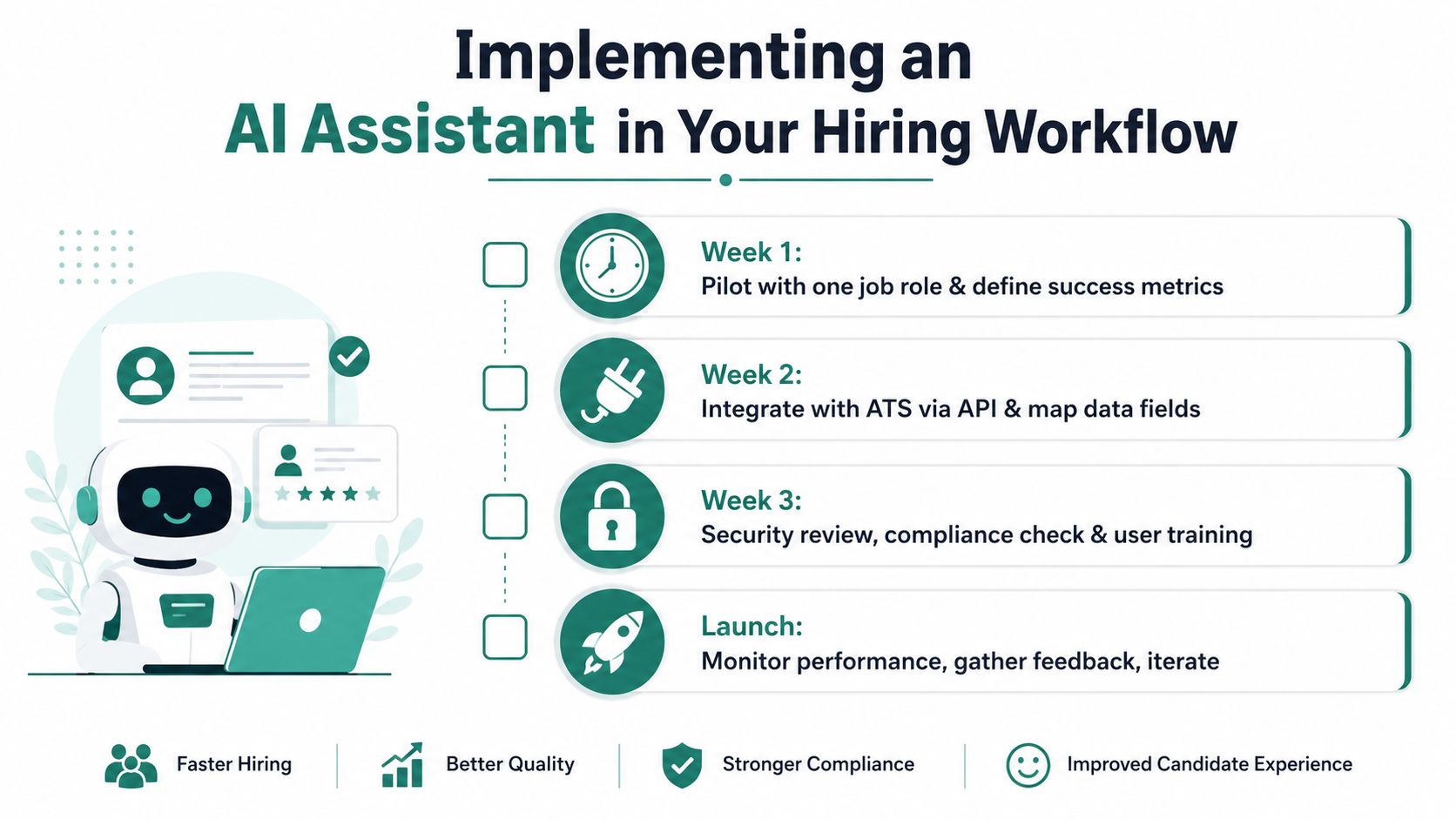
High-volume roles are usually the cleanest pilot. Pick one job family, define the screening criteria, and decide what “good” looks like before launch. That keeps the assistant focused and gives the team a stable baseline for comparison.
Most hiring teams need the assistant to work with platforms they already use, such as Greenhouse, iCIMS, Workday, ADP, and Paylocity. The goal is bidirectional status sync, so if a candidate moves forward in the assistant, the ATS reflects it, and if a recruiter updates the ATS, the assistant stays aligned. Without that, the workflow fractures fast.
Recruiters and hiring managers need to know when to trust the scorecard, when to override it, and when to keep scheduling manual. Automatic booking works well for clear, high-confidence candidates. Coordinator-led scheduling makes sense when the interview loop needs human judgment or when calendars are especially constrained.
Implementation rule: launch the assistant where the rules are clear, then expand after the team trusts the data.
Analytics dashboards matter because the assistant is part of the funnel. You want to know where candidates drop off, whether interview booking is working, and whether the scorecards are producing useful comparisons. That feedback loop is what lets the assistant improve instead of staying static.
AI assistants work because they're pipelines, not magic. They capture input, interpret intent, fetch the right context, generate a response, and sometimes execute a real action in connected systems. The orchestration layer is the part that matters most in hiring, because that's where language becomes screening, scheduling, scoring, and status updates.
The model itself is only one component. Retrieval grounds answers in role-specific facts, memory keeps the interaction coherent, and integrations turn conversation into work. If any of those layers is missing, the assistant becomes less reliable and less useful in a hiring workflow.
The tradeoff for hiring teams is clear. You can gain 24/7 screening, faster movement through the funnel, and more consistent evaluations, but only if the process is transparent enough to audit and flexible enough to explain. As adoption continues across industries, the teams that do best will be the ones that can configure the system well, monitor its behavior, and keep improving it over time.
If you're evaluating vendors, ask how the assistant grounds answers, how it applies the rubric, how it logs actions, and how it supports fair screening. Then pilot it on one role, review the scorecards, and decide whether the workflow helps your team hire better.
Talent Pronto offers conversational screening that asks candidates role-specific questions, scores responses against defined criteria, and can coordinate interview scheduling inside existing hiring workflows. If you're evaluating how AI assistants fit into hiring, visit Talent Pronto to see how that approach maps to early-stage screening and candidate coordination.

Talent Pronto is an AI-powered hiring platform built around Anna, our intelligent AI that conducts 24/7 conversational screening, evaluates candidates against specific job requirements and compliance needs, and schedules interviews. Run everything on the Talent Pronto ATS, our all-in-one applicant tracking system with a branded careers site and Anna built in, or keep your existing ATS and let Anna integrate with Greenhouse, Ashby, iCIMS, Jobvite, Lever, Oracle, and more. Either way, we help organizations reduce time-to-hire and build stronger teams.