Explore phone screen replacement options for hiring. Compare live screens vs AI conversational screening on experience, bias, ROI and fit.
Your recruiting team is probably doing this right now. A coordinator is chasing calendars, a recruiter is burning half the day on repetitive fifteen-minute calls, and solid candidates are sitting in limbo because nobody can get to them fast enough. The usual response is to “add efficiency.” That's too small a fix.
The question is whether your team still needs the classic live phone screen for every applicant.
That's what phone screen replacement is really about. It isn't about removing human judgment from hiring. It's about deciding which parts of early screening need a person, which parts need structure, and which parts are wasting recruiter time while hurting candidate experience.
I've seen too many teams defend live screens out of habit. They call it relationship-building, but most of those calls are basic eligibility checks, repeated compensation questions, and loosely scored conversations that vary by recruiter. That's not relationship-building. That's expensive administrative work disguised as assessment.
There's a better way to think about it. Replace live screens when volume is high, consistency matters, and speed affects conversion. Keep live screens when nuance matters more than throughput. Use a hybrid model when you need both.
A hiring team with fifty open roles doesn't fail because recruiters can't talk to candidates. It fails because recruiters spend too much time talking to the wrong candidates in the wrong format at the wrong stage.
That's why phone screen replacement has moved from an operational side note to a real hiring strategy. In consumer tech, replacing a damaged screen became a massive recurring expense because breakage happens often and the old model of “just fix it when needed” stopped being simple. Allstate Protection Plans' reporting found that Americans broke more than 50 million phone screens in a single year and spent $3.4 billion replacing them in 2018. That same reporting later noted spending had climbed to $8.3 billion in 2023. You can see the details in this Allstate Protection Plans survey coverage from Techlicious.
Hiring has a similar pattern. The process people treat as small and routine often becomes one of the biggest recurring drains in the funnel.
Most live phone screens are doing three jobs at once:
That sounds reasonable until application volume spikes. Then the same process turns into a queue. Candidates wait. Recruiters improvise. Hiring managers receive uneven feedback.
Practical rule: If your recruiters spend more time scheduling and repeating the same opening questions than evaluating evidence, your phone screen process needs redesign, not more discipline.
A lot of teams hear “replace phone screens” and assume the alternative is either cold automation or no screening at all. That's the wrong frame. Replacement can mean full substitution for some roles, partial substitution for others, or a structured front-end layer before a human ever joins the process.
That distinction matters because different jobs need different levels of nuance. A seasonal retail role doesn't need the same opening step as a senior product leader search. Treating them the same is lazy process design.
Phone screen replacement doesn't mean you stop screening. It means you stop relying on unscripted recruiter calls as the default screening mechanism.
The better model is structured conversational screening. Instead of making every recruiter run the same early-stage conversation by hand, teams use a defined question set, a clear rubric, and a consistent interaction format delivered through chat or voice.
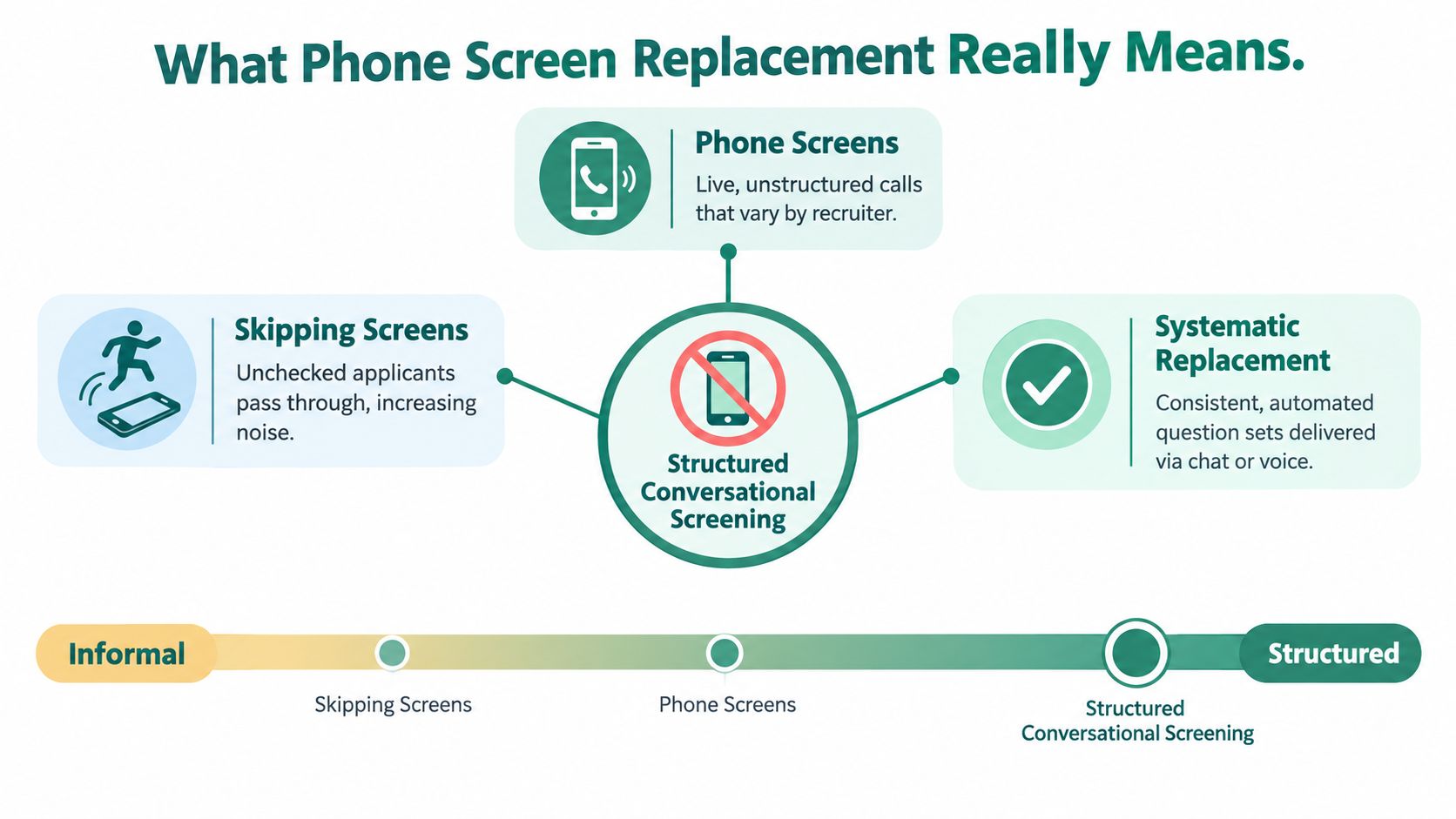
Here's where people get sloppy. They bundle very different practices under the same label.
Skipping screens entirely
This is the weakest option. Applicants move forward with minimal validation, which creates noise later. Hiring managers feel it first.
Traditional live phone screens
A recruiter or coordinator runs a call, often with a loose script. Quality depends heavily on the person conducting it. Some recruiters probe well. Others don't.
Systematic replacement with structured conversational screening
Candidates answer consistent, role-specific questions in a guided format. The employer defines criteria. The process captures comparable information before a recruiter reviews outcomes.
The third option is what serious teams should evaluate. It's not anti-human. It's anti-chaos.
In a live phone model, the recruiter's job is often part scheduler, part explainer, part evaluator, and part note-taker. That's a poor use of expensive talent. In a structured model, the recruiter shifts toward exception handling, calibration, and deeper assessment.
That mirrors what happens in other categories when replacement decisions get smarter. In consumer devices, the issue often isn't “Can I replace the screen?” but whether the replacement is worth it given age, value, and quality tradeoffs. If you want a practical example of how physical screen protection products are framed for buyers, this overview of phone screen jack designs from Premier Broadband is useful because it shows how quickly “screen replacement” becomes a broader decision about durability, cost, and user priorities.
The right screening model does not make final hiring decisions for you. It should gather evidence, apply the rubric you set, and present information in a format your team can compare.
Keep the machine on the repetitive work. Keep humans on judgment, trade-offs, and final decisions.
That line is where good implementation lives. Teams that forget it either over-automate and lose trust, or under-automate and keep the same bottleneck with fancier software.
Live screens and automated conversational screening solve different problems. Treating this as a straight tech swap leads to bad process design.
A common failure case looks like this. A recruiting team fills 60 hourly openings across five locations, keeps live phone screens for every applicant, then wonders why response times slip and recruiter notes become uneven. The problem is not effort. The problem is using a high-touch method for work that is repetitive, volume-driven, and easy to standardize.
Start with the decision, not the tool. Replace live screens when volume is high, baseline qualification is clear, and consistency matters more than improvisation. Keep live screens when the role needs persuasion early, the requirements are nuanced, or a recruiter's judgment changes the outcome.
| Evaluation Criteria | Traditional Live Phone Screen | Automated Conversational Screening |
|---|---|---|
| Speed and coverage | Depends on recruiter availability and scheduling | Available immediately and can engage applicants at any hour |
| Consistency | Varies by recruiter, script discipline, and note quality | Uses the same role-specific questions and scoring structure |
| Candidate responsiveness | Slower when candidates must wait for a callback | Better fit for candidates who want to respond on mobile and on their own time |
| Interviewer effort | High manual effort for repetitive calls | Lower manual effort for standard early-stage checks |
| Scalability | Gets strained during hiring spikes | Handles surges more predictably |
| Data capture | Notes can be uneven and hard to compare | Produces structured, reviewable outputs |
| Best use case | Nuanced, relationship-heavy, or senior roles | High-volume, repeatable, or criteria-driven screening |
A strong recruiter can hear hesitation, test motivation, adjust the conversation, and sell the role in real time. That matters in senior hiring, hard-to-close markets, and roles where career story matters as much as baseline qualifications.
But that strength is expensive. If your team uses live calls to confirm shift availability, location fit, pay alignment, or license status, you are burning recruiter time on checks that do not require human judgment.
Automated conversational screening handles top-of-funnel repetition better than live calls. It reaches every applicant quickly, asks the same core questions, and captures answers in a format hiring managers can compare.
That is why it fits recurring role families so well. For a practical breakdown of how structured workflows improve early-stage filtering, this guide to automated candidate screening is worth reviewing.
The same operating logic shows up in other service environments. Teams use automation first when immediate response and standardized intake matter, then route exceptions to people. This example of voice AI for patient communication follows that model closely.
The best screening systems are blended. Use automation to handle the first pass for roles with clear must-haves and heavy applicant flow. Use recruiters after that point, where context, persuasion, and trade-offs matter.
That split improves recruiter capacity without stripping judgment out of the process.
Here is the practical difference hiring teams feel fastest. Live screens often produce thin notes and inconsistent comparisons. Automated screening produces documented answers against the same criteria every time.
If your hiring managers regularly complain that early candidates are hard to compare, standardize the first screen. If they complain that strong candidates are dropping because the process feels cold or rigid, keep a live screen in the mix for that role.
Use the method that matches the decision you need to make. That is the point.
Candidate experience gets oversimplified. Teams talk about “human touch” as if a delayed callback from a rushed recruiter automatically feels better than a fast, organized interaction. It often doesn't.
Candidates usually want three things early in the process. They want a quick response, clear expectations, and confidence that they're being evaluated fairly. Live phone screens can deliver that. They just don't deliver it reliably.
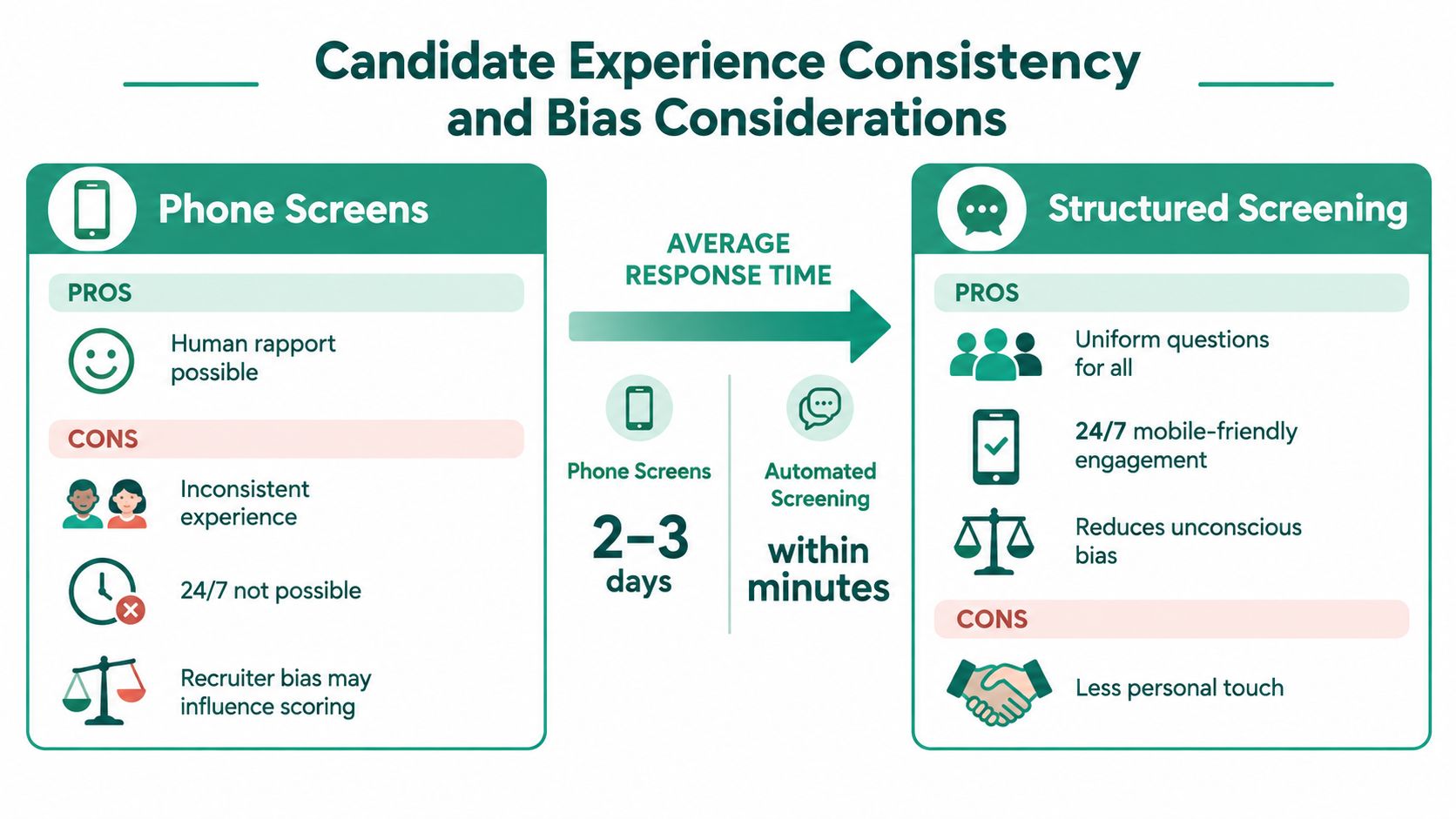
A structured process can feel less personal, but it often feels more professional. Candidates know what's being asked. They don't have to coordinate a callback during work. They can respond on mobile when they have time.
That matters more than many teams admit.
A process feels fairer when every candidate gets the same core questions and the same chance to answer them fully.
Bias in early screening usually shows up through inconsistency, not malice. One recruiter likes concise answers. Another prefers warmth. One gives a candidate room to recover after a weak start. Another closes fast and moves on.
Uniform question sets and documented scorecards don't solve fairness on their own, but they do create a cleaner basis for review. If your team wants a practical perspective on process design and fairness controls, these bias mitigation strategies are worth reviewing.
The broader policy trend is moving in the same direction. The EU's repairability score for smartphones and tablets is built from six specific factors: disassembly depth, fasteners, tools, spare part availability, software updates, and repair information. That matters because it turns a vague claim into a measurable framework. The European Commission Joint Research Centre summary lays out those six factors clearly. Hiring teams should think the same way. If you care about fairness, define what counts and evaluate against it.
Structured screening shouldn't be a trap. Good systems let candidates opt out or use a traditional path if they have accessibility concerns, preference issues, or technical limitations.
That's a practical trust move, not a nice-to-have.
A strong setup also handles candidate questions consistently. Pay range, benefits, schedule expectations, and culture basics shouldn't depend on which recruiter happened to pick up the call that day. When candidates get clean answers early, they self-select better and your funnel gets healthier.
If you can't measure whether phone screen replacement improved the funnel, you're guessing. “The team likes it” isn't enough. “Recruiters say it feels faster” isn't enough either.
Track the part of the process the change is supposed to fix.
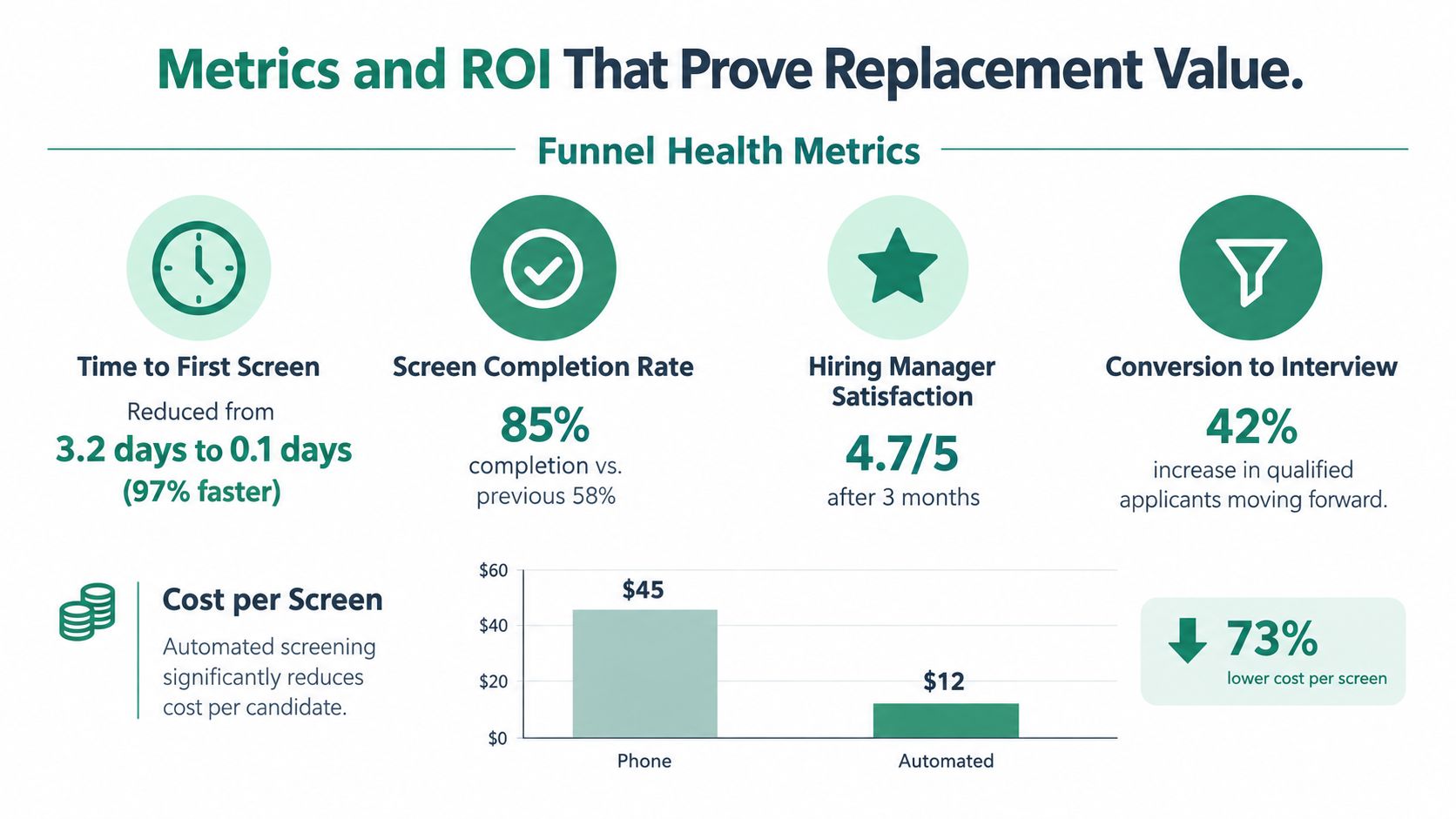
Measure these first:
None of those metrics matter in isolation. Read them together.
If time to first screen improves but interview conversion collapses, you've built a fast filter that isn't identifying the right people. If recruiter capacity improves but candidates abandon the process, the workflow may be too rigid or poorly explained.
Before replacing phone screens, capture your current state for one or two role families.
Look at: 1. Current response lag 2. How often candidates no-show or ghost 3. How often recruiters repeat the same questions 4. What hiring managers do with recruiter notes
Operator view: Replacement value shows up when recruiters spend less time collecting basic information and more time resolving edge cases, calibrating quality, and closing strong candidates.
There's a reason this topic keeps getting bigger in the consumer market. Screen replacement isn't a minor niche. Recent market research places the global smartphone repair market at $22.66 billion in 2026 with projected growth to $45.3 billion by 2035 at an 8% CAGR, and another report says screen replacement accounts for 43% of that market. You can review those figures in this smartphone repair market report summary.
The lesson for hiring is simple. Repetitive, high-frequency problems deserve structured systems. If one step is clearly the largest recurring burden, redesigning it usually creates outsized downstream value.
This isn't one-size-fits-all. Some roles should move almost entirely away from traditional live phone screens. Others should never do that.
The right answer depends on volume, repetitiveness, risk, and how much nuance the role requires in the first interaction.
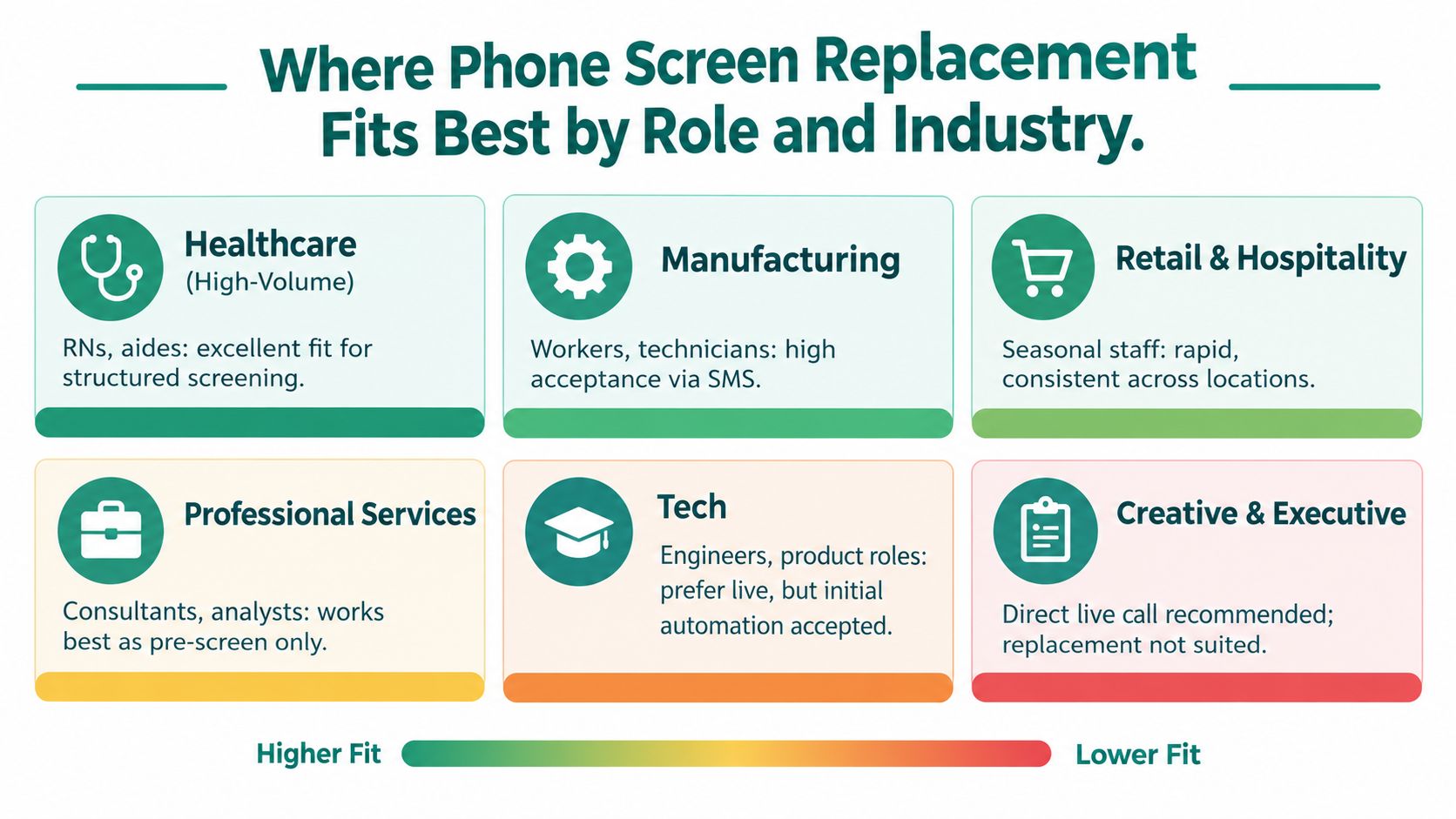
Healthcare support roles, manufacturing hiring, retail, hospitality, and other high-volume front-line jobs are strong candidates for full replacement at the screening stage.
Why? The opening questions are often stable: - availability - shift flexibility - certifications or license status - location and commuting - willingness to meet basic job conditions
In those environments, consistency matters more than recruiter improvisation. Teams need speed, coverage, and a defensible way to compare large applicant pools.
Professional services and many tech roles usually do better with a hybrid model.
Use structured screening first to gather standardized information, confirm baseline fit, and answer common questions. Then bring in a recruiter or hiring manager for the deeper live conversation. That works especially well when the role includes both objective screen-in criteria and subjective assessment areas.
Replace the repetitive opener. Keep the human conversation where judgment actually adds value.
Executive hiring, highly creative roles, and searches where candidate motivation is the signal should usually keep a live first conversation.
That doesn't mean the process should stay unstructured. It means the structure belongs in the scorecard and evaluation rubric, not necessarily in a fully automated opening interaction.
The same kind of decision logic appears in consumer repair economics. Issue often isn't the repair price alone. It's whether repair is rational relative to device value and quality differences. One market guide notes that flagship screen repairs can run about $180 to $420, while premium handset replacements can exceed $900 to $1,200 in major markets. That same guide also notes screen replacement holds 34.2% to about 43% of market share. The details are summarized in this mobile screen replacement price guide. Hiring leaders should make the same kind of break-even decision instead of forcing one process onto every role.
The safest rollout is a pilot, not a full switch. Pick one role family with repeatable requirements, enough applicant volume to test properly, and a hiring manager willing to compare outcomes instead of defend old habits.
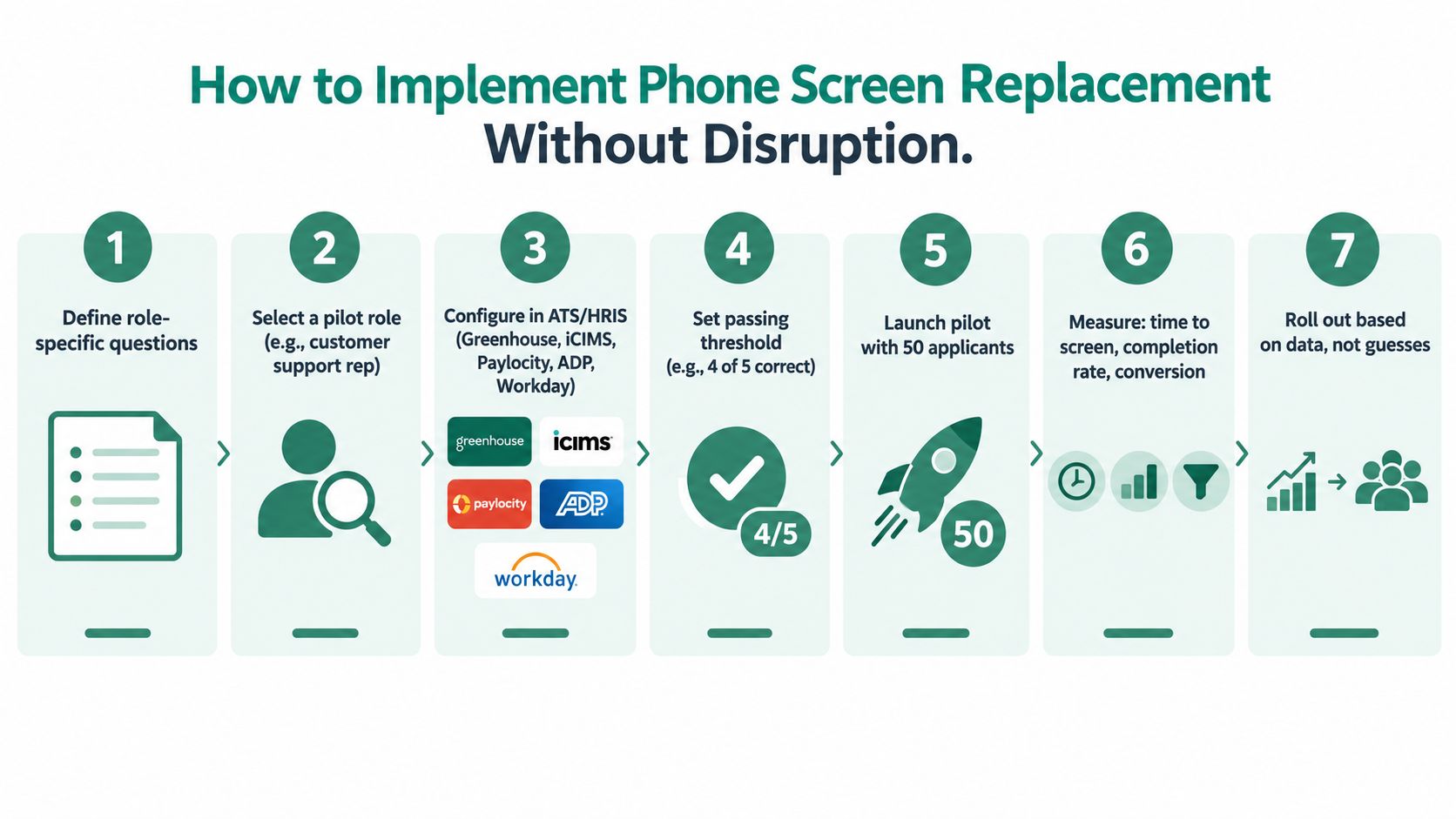
Use this checklist:
Define the screen-in criteria.
Identify the few questions that actually determine early fit.
Write role-specific prompts and rubrics.
Don't automate a bad script. Tighten the questions first.
Sync it to your systems.
If your team runs on Greenhouse, iCIMS, Paylocity, ADP, or Workday, make the statuses and candidate data move cleanly. This guide to recruitment workflow automation is useful if your process still depends on manual handoffs.
Decide who handles scheduling.
Some teams want automatic booking for qualified candidates. Others want a coordinator review step. Both can work.
Recruiters don't need a philosophical lecture. They need to know what changes, what stays theirs, and how success will be judged.
Hiring managers need even less. Show them stronger candidate summaries and better comparability. If they see clearer inputs, they'll support the shift.
One policy change in the physical repair world is worth noting because it reflects where operational expectations are heading. New EU rules for smartphones and tablets, which began applying on 20 June 2025, require manufacturers to supply key spare parts within 5 to 10 working days and keep them available for at least 7 years after a model stops being sold in the EU. The European Commission announcement makes the standard clear. People now expect systems to be designed for reliability and serviceability. Hiring processes should meet the same standard.
A smart implementation keeps the candidate moving, gives recruiters cleaner signal, and doesn't break the rest of the funnel.
Talent Pronto gives hiring teams a practical way to replace repetitive phone screens with structured conversational screening, role-specific scorecards, and workflow automation that fits the systems they already use. If you want a faster, more consistent front-end hiring process without giving up employer control, visit Talent Pronto.

Talent Pronto is an AI-powered hiring platform built around Anna, our intelligent AI that conducts 24/7 conversational screening, evaluates candidates against specific job requirements and compliance needs, and schedules interviews. Run everything on the Talent Pronto ATS, our all-in-one applicant tracking system with a branded careers site and Anna built in, or keep your existing ATS and let Anna integrate with Greenhouse, Ashby, iCIMS, Jobvite, Lever, Oracle, and more. Either way, we help organizations reduce time-to-hire and build stronger teams.