Discover how an AI interview assistant transforms hiring with conversational screening, scoring rubrics, and ATS integrations. Learn implementation, compliance
As many as 98.4% of Fortune 500 companies now use AI in the hiring process, according to a 2025 Brookings summary cited in this management review. That number changes the conversation. The question isn't whether an AI interview assistant belongs in modern hiring. The question is whether your team is deploying one in a way that improves speed without creating compliance, dropout, or fairness problems.
The market has moved past FAQ bots and resume keyword filters. In high-volume hiring, teams now use conversational systems to screen, qualify, schedule, document, and route candidates before a recruiter touches the file. Some setups work well. Others create friction, candidate distrust, and audit headaches.
The difference usually comes down to operational design. The strongest deployments keep the conversation short, tie scoring to role criteria, document human oversight, and treat compliance as part of implementation, not a legal afterthought.
Teams still lump every hiring chatbot into one bucket. That's a mistake. A real AI interview assistant isn't just a widget that answers benefits questions or tells someone their application is under review.
It's a screening layer that runs structured conversations with applicants, evaluates what they say against job requirements, and moves the process forward inside the hiring stack. In practice, that means the system can contact candidates through email, SMS, or a career site flow, ask calibrated questions, handle follow-ups, and send outcomes back into the ATS.
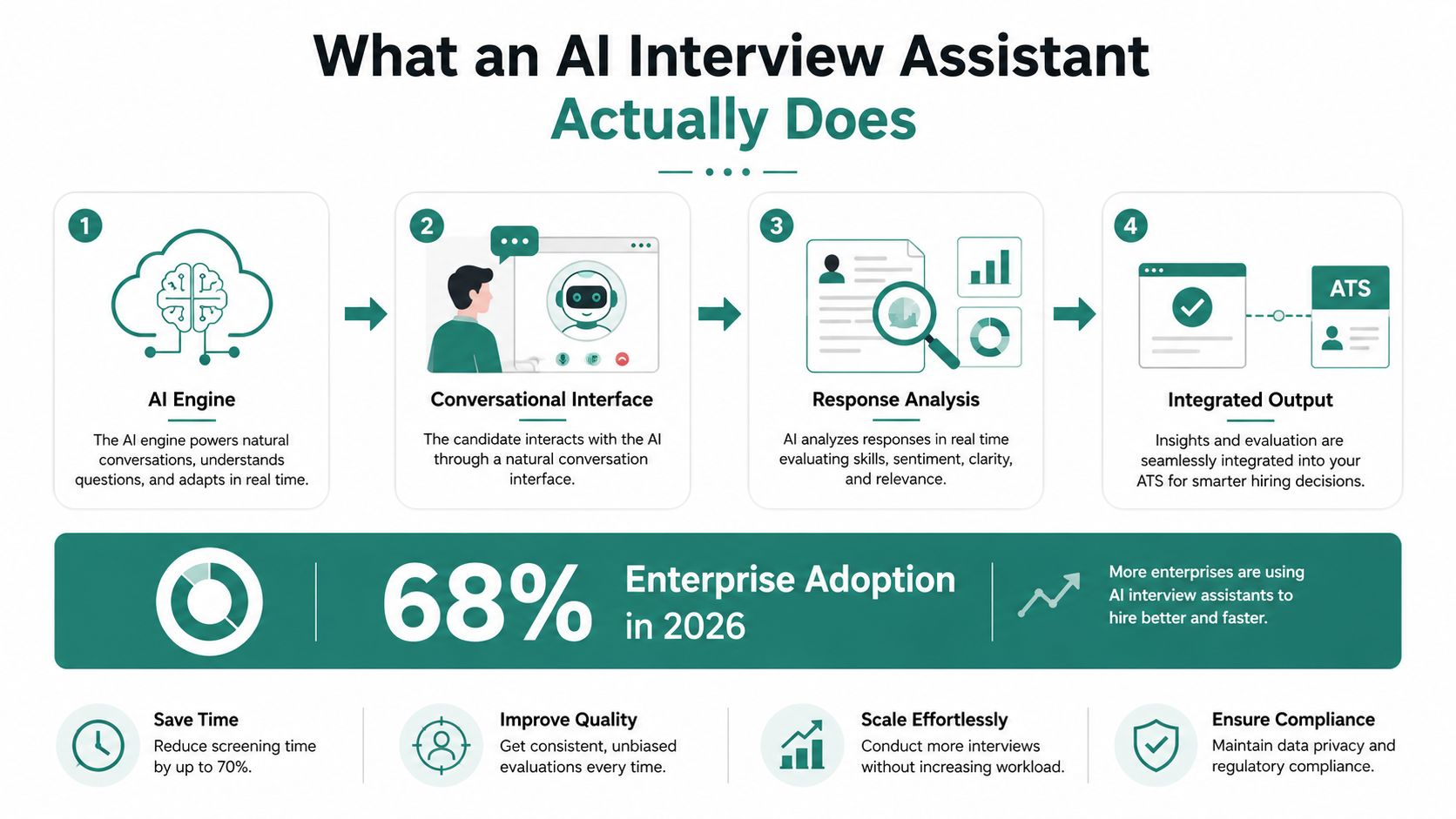
A candidate applies. The assistant starts outreach immediately or within a defined trigger window. It asks screening questions tied to the role, such as shift availability, licensure status, system design experience, or customer-facing conflict resolution.
A passive chatbot stops there. An interview assistant doesn't.
It keeps context across turns, notices when an answer is incomplete, asks for clarification, and records the conversation in a format recruiters can use. If the candidate qualifies, it can route them to scheduling or recruiter review. If the response set misses required criteria, it can hold the application for human review or move the person into a defined disposition path.
The common failure is treating this like a messaging feature instead of an evaluation system. If your team wants a plain-language explainer of the underlying mechanics, this breakdown of how AI assistants work is useful because it separates conversation handling from decision logic.
Practical rule: If the tool can't explain why a candidate was advanced, scored, or flagged, it isn't ready for production hiring.
Another practical detail people overlook is presentation. Candidate trust is shaped by every touchpoint around the conversation, including employer branding and recruiter identity. Teams polishing that front-end often also standardize assets like a corporate team headshot solution so candidate communications feel coherent rather than stitched together from different systems.
The useful mental model is simple. An AI interview assistant is not a help desk bot. It's a 24/7 structured screening operator that can manage large applicant volumes while preserving recruiter control over final decisions.
The best hiring outcomes don't come from "using AI." They come from a narrow set of capabilities that move the funnel. A strong assistant does four things well: it screens conversationally, scores consistently, schedules quickly, and writes back to the system of record.
A peer-reviewed article summarized in Atlantis Press notes that AI tools have outperformed humans in screening applicants by at least 25%, and it cites a concrete L'Oréal example where resume review time dropped from 40 minutes to 4 minutes after AI screening was adopted. The same source also references research showing a machine-learning recruitment framework reduced manual screening effort by 80%. Those gains explain why interview assistants became operational infrastructure, not side experiments.
The first capability is multi-turn screening. A production tool shouldn't accept vague answers at face value. If a warehouse applicant says they've handled safety issues before, the assistant should ask for a specific example. If a nurse candidate states they can work nights, the flow should verify schedule preference and role constraints in the same thread.
The second capability is scoring. Good systems don't generate a generic summary. They map answers against competencies the hiring manager already uses. That might include patient communication, escalation judgment, shift flexibility, system design clarity, or conflict handling.
Candidate screening gets more defensible when every score traces back to a documented rubric instead of recruiter memory.
The third capability is automated scheduling. This matters more than many procurement teams expect. Industry research on interview scheduling found that each additional day between application and interview scheduling increases candidate withdrawal by 8%. Fast booking isn't just convenience. It's a conversion mechanism.
The fourth capability is integration depth. If the assistant doesn't sync statuses, transcripts, notes, and routing outcomes back into the ATS, the team ends up with duplicate work and fragmented records. That's where many pilots stall. Recruiters won't trust a tool that creates extra admin.
| Capability | Primary Metric Impact | Example Application |
|---|---|---|
| Conversational screening | Faster early-stage qualification and better completion flow | A logistics employer asks about shift availability, safety incidents, and physical job acknowledgments in one conversation |
| Scoring rubrics | More consistent candidate comparison | A software engineering flow rates problem framing and technical communication against predefined criteria |
| Autonomous scheduling | Lower candidate abandonment between qualification and interview booking | A clinic screens for licensure and immediately offers approved interview slots |
| ATS integration depth | Cleaner workflows and stronger auditability | Candidate status, transcript, and scorecard sync into Greenhouse, Workday, or iCIMS for downstream action |
One vendor example in this category is Talent Pronto. Its assistant conducts conversational screening, applies role-specific rubrics, and prepares structured scorecards while leaving advancement and rejection decisions to the employer. That's the model to look for broadly, whether you're evaluating Talent Pronto or another platform.
The easiest way to spot confusion in a buying process is when a team compares an agentic assistant to the chatbot already bundled into its ATS and assumes they're functionally similar. They aren't.
Legacy ATS chatbots are rule trees. They work when the candidate follows the script. Ask for application status, select from preset options, get a preset answer back. That's useful for support, but it's weak for evaluation. If you want a basic primer on that older category, this article on a chatbot for recruitment is a helpful contrast point.
Agentic assistants can interpret free-text responses, maintain context, and adjust the next question based on what the candidate just said. That changes the quality of evidence you collect. Instead of "yes/no" data, the employer gets actual examples, clarifications, and competency signals.
Legacy bots also tend to sit outside the core workflow. They pass limited data one way into the ATS. Agentic tools are usually built around APIs and event triggers, so status changes, scheduling actions, and transcripts move both directions.
This doesn't mean agentic is automatically better in every scenario. A poorly configured assistant can over-probe, sound unnatural, or ask one follow-up too many. That's where candidate abandonment starts. Older bots are rigid, but they're predictable.
If the job only requires answering policy questions or checking application status, a legacy bot may be enough. If the job requires evaluating judgment, communication, or job fit, a true interview assistant is the better tool.
| Criterion | Legacy ATS Chatbot | Agentic AI Interview Assistant |
|---|---|---|
| Conversational depth | Scripted, menu-based responses | Multi-turn conversations with context retention |
| Behavioral probing ability | Minimal to none | Can ask follow-ups based on prior answers |
| Integration architecture | Often one-way or limited sync | Bidirectional API-driven workflow updates |
| Employer configurability | Basic FAQs and routing rules | Role-based rubrics, screening logic, and workflow triggers |
| Candidate dropout risk | Lower for simple tasks, higher when forced into rigid flows | Lower when concise and well-tuned, higher if conversations become long or uncanny |
Use the simpler tool for support. Use the deeper tool for screening. Teams run into trouble when they expect one system to do both equally well.
The strongest use cases are the ones where volume, speed, and structured criteria matter at the same time. That's why healthcare, logistics, retail, hospitality, and technical hiring keep showing up first.
Healthcare is a clear example. A hospital system may need to screen large nursing and allied health applicant pools while verifying licensure, shift preferences, unit fit, and patient-care scenarios before a recruiter starts outreach. In that environment, the assistant isn't replacing the recruiter. It's filtering for baseline readiness and documenting the reasoning.
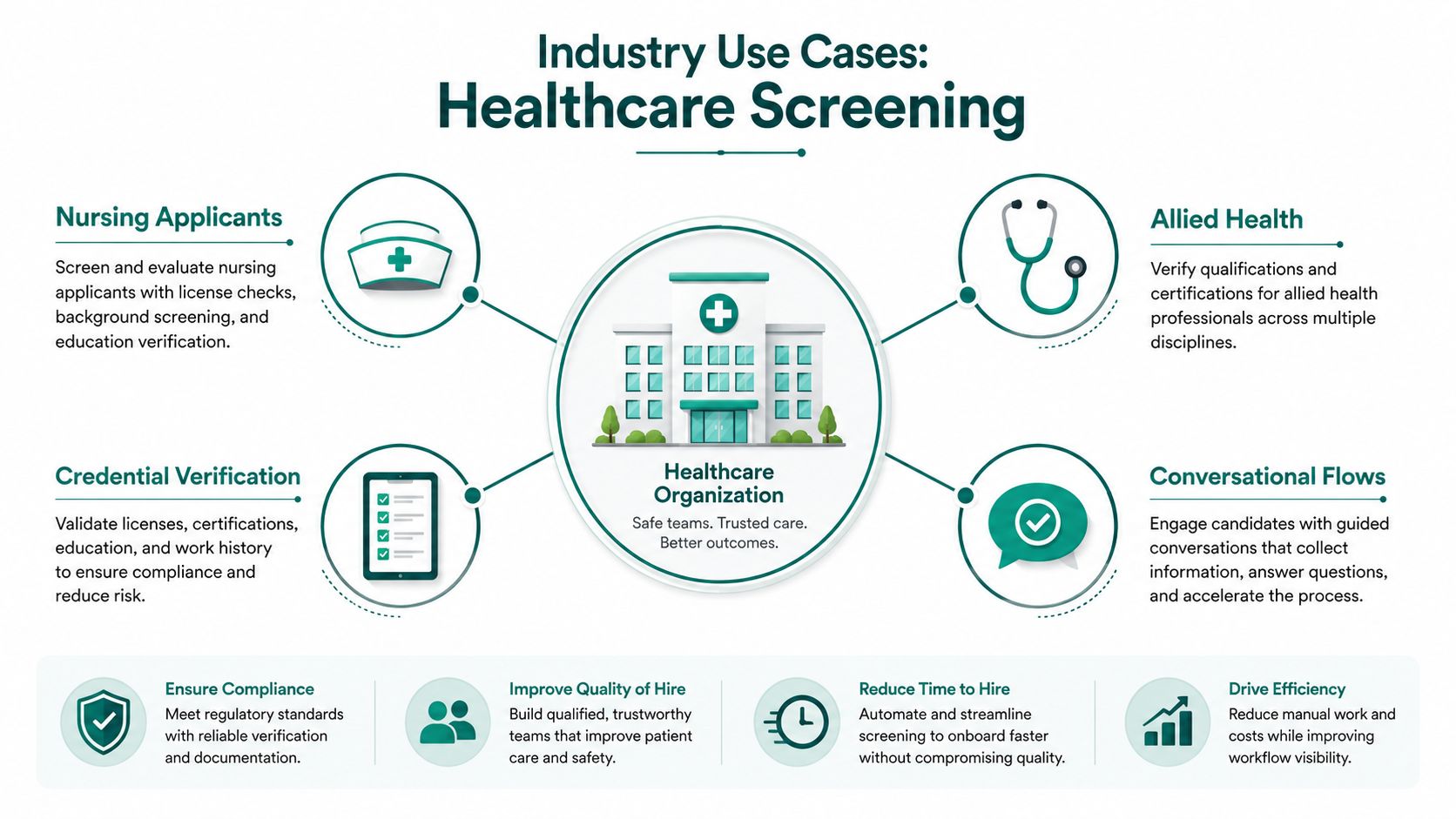
Those are very different jobs, but the operating principle is the same. The assistant asks role-aware questions early, captures structured evidence, and only then routes the candidate.
A short product demo helps make the difference visible in healthcare-style workflows:
The teams that get value keep the screen tightly focused on disqualifiers, must-have criteria, and a small number of judgment signals. They don't try to replicate a full recruiter interview inside the tool.
The weak pattern is overloading the assistant with every question a hiring manager has ever asked. Once the flow becomes bloated, candidates stop treating it like a first step and start treating it like unpaid labor. That's especially risky in roles where applicants already have multiple options.
AI can make screening more consistent, but consistency does not make a hiring decision fair. A fixed conversational flow may reduce recruiter-to-recruiter variation while still reproducing bias through its questions, scoring rules, training data, or escalation logic.
The Brookings summary cited earlier reported that language-model screening selected men's and women's names at equal rates in only 37% of tests across 27 experiments, involving three LLMs and nine occupations. Male-named resumes were favored in 51.9% of the remaining cases, while female-named resumes were favored in 11.1%. Treat those findings as a deployment warning. Test the actual assistant, rubric, and role configuration before relying on aggregate vendor assurances.
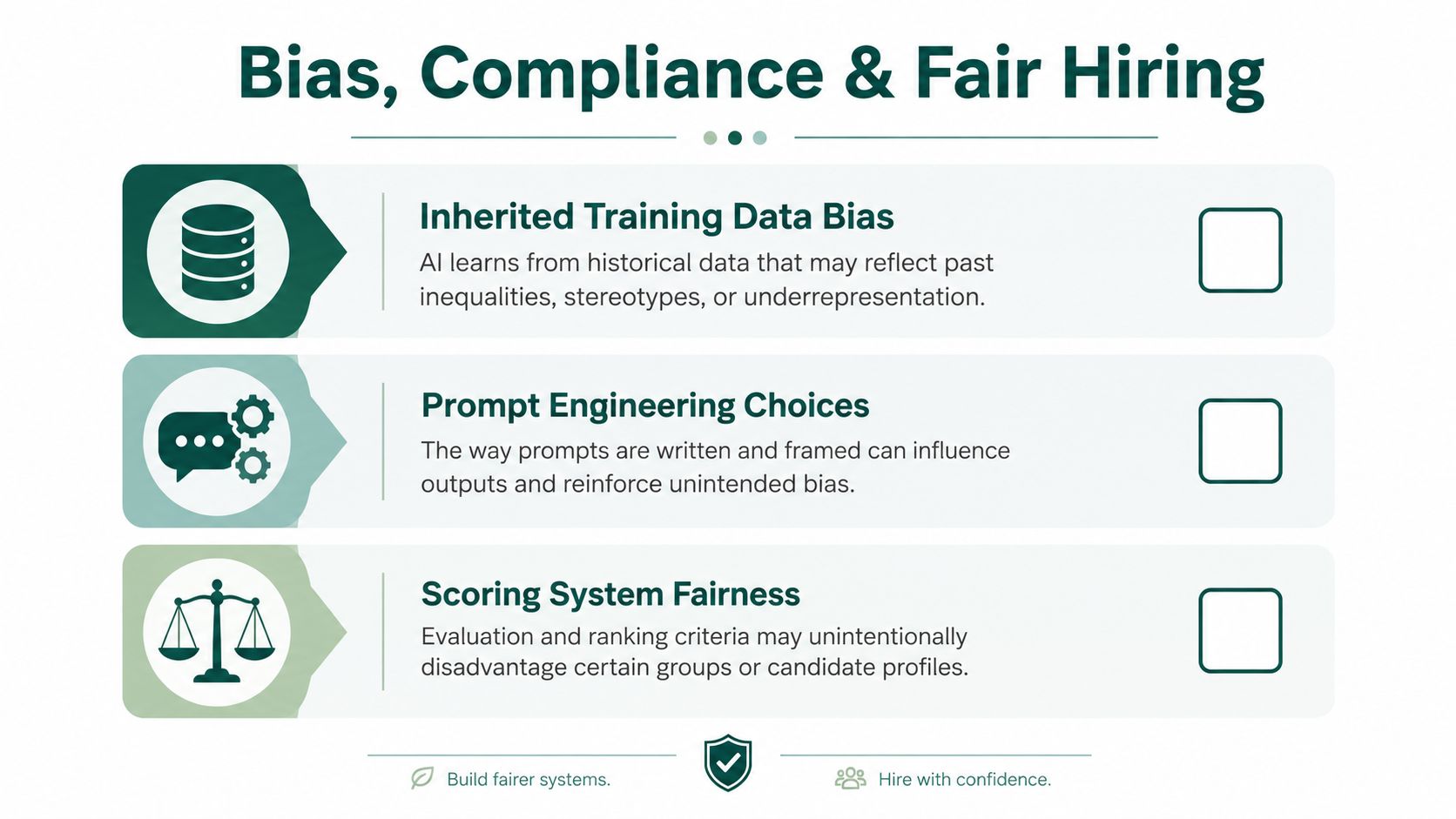
Bias can enter through prompt wording, acceptable communication styles, response-time expectations, language handling, and the evidence treated as proof of competence. An agentic assistant may ask follow-up questions and adapt the conversation, which can produce richer evidence than a legacy ATS chatbot. It also creates more points where inconsistent probing or untested assumptions can affect a score.
Recent reporting in Forbes reported that 63% of job seekers had faced an AI interview, and that most did not describe the experience positively. The same coverage found that 36% reported age bias from both AI and human interviewers, while 27% reported race or ethnicity bias from both. Candidate trust therefore belongs in the operating model. A standardized process can still feel unfair, particularly when applicants cannot understand why the system asked a question or rejected them.
By 2026, buying the software is only the starting point. EU AI Act hiring guidance identifies recruitment AI as high-risk in the EU, with core employment-system obligations applying from 2 Aug 2026. These include risk management, documentation, human oversight, and monitoring. The guidance also identifies rules already enforced in New York City, California, Illinois, and Texas.
Before launch, confirm:
Standardized screening helps only when the standard itself is defensible.
Document the rubric, test for adverse patterns by role and demographic group where lawful, retain human oversight, and provide candidate alternatives before production launch. A lower dropout rate is not a successful outcome if it comes from discouraging applicants who need another way to complete the screen.
Most failures happen because teams launch too wide, too early, with weak scoring design. The first 90 days should be sequenced like an implementation program, not a feature rollout.
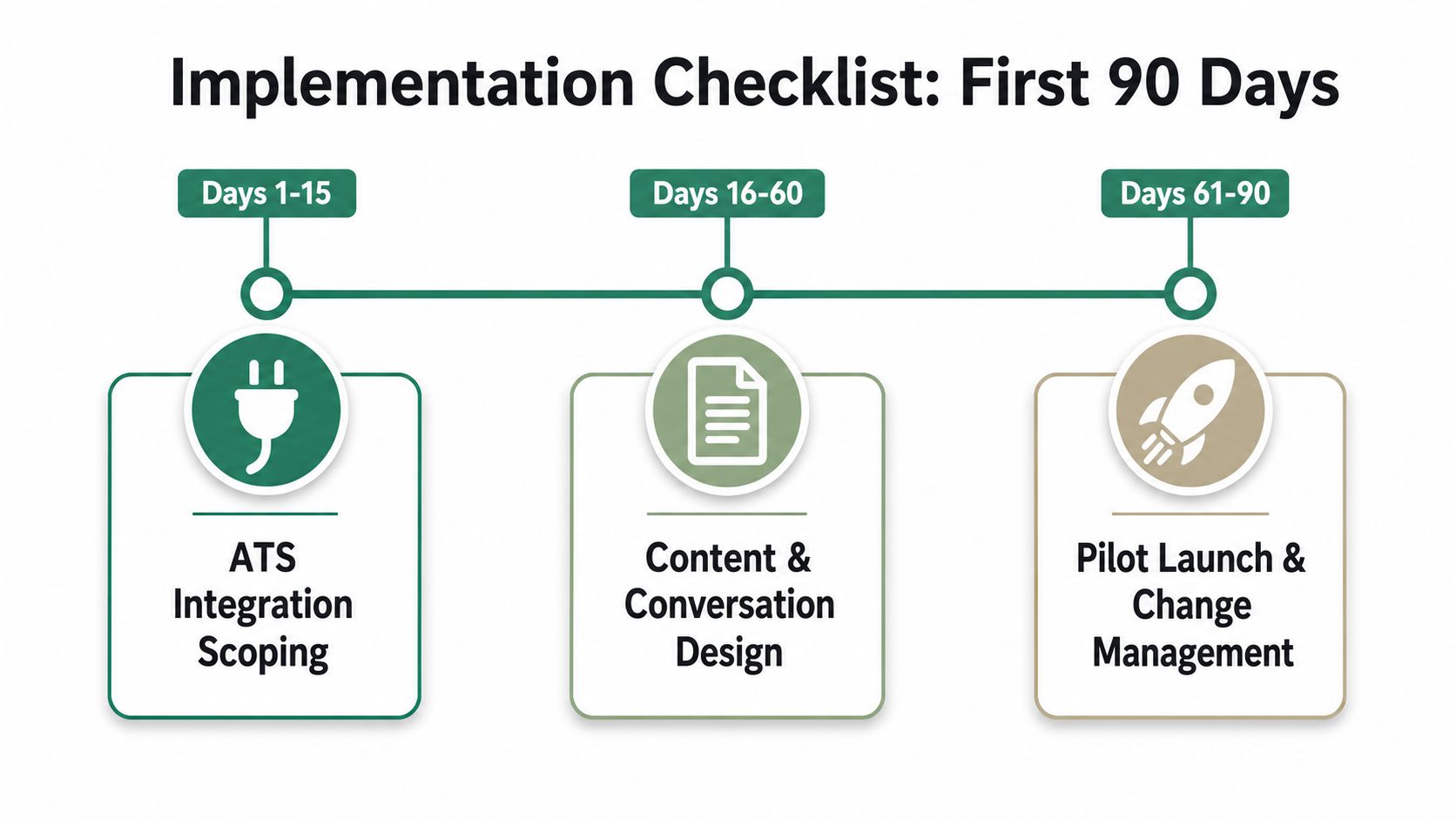
Start with systems and ownership. Map ATS fields, application triggers, candidate statuses, recruiter permissions, and any scheduling dependencies. If your organization uses Greenhouse, Workday, iCIMS, ADP, or Paylocity, clarify which platform remains the source of truth for each status change.
Create one operating group with TA, recruiting operations, HRIT, legal, and at least one hiring manager from a high-volume function. If no one owns rubric approval, the project will drift.
Build flows for one or two high-volume roles first. Use required qualifications, knockout questions, and a limited competency set. Keep conversations short enough that a candidate can complete them without feeling trapped in a second application.
Draft scorecards with managers in plain language. "Strong patient de-escalation example" is usable. "Demonstrates enterprise-ready empathy competencies" usually isn't.
Pilot internally before exposing the process broadly. Recruiters should test the flow, try edge cases, and review whether scoring aligns with what they'd expect from human screens.
This is also where candidate transparency matters. Candidate-experience research reported that publishing expected hiring steps and durations can reduce drop-off by up to 40%. Separate guidance from Recrew states that more than 75% of candidates abandon a process that feels unnecessarily long or complicated. Tell applicants what will happen, how long it should take, and what comes next.
Launch into production with weekly review cadences. Watch completion patterns, candidate complaints, recruiter override behavior, and manager confidence in the scorecards.
Use a simple go-live checklist:
Teams don't need perfect automation in the first quarter. They need a stable process they can defend and improve.
If measurement stops at hours saved, the operating picture remains incomplete. Evaluate an AI interview assistant across funnel speed, screening quality, candidate experience, and control over automated decisions.
Begin with funnel velocity: time to screen, time to scheduled interview, and time to hire. These measures show whether the assistant shortens the early process. Pair them with quality indicators, including interview-to-offer ratio, hiring manager confidence in screened candidates, and retention trends after hiring. For a fuller view of downstream performance, use this guide to quality of hire metrics.
A working paper summarized by Screenz found that imposing a 30 to 40 minute AI interview at the application stage produced a 75% dropout rate among invited candidates. The operational lesson is direct: a long first-stage conversation can remove candidates before the team gathers useful evidence.
Measure candidate experience within the flow, not only after hiring. Completion rate by stage, opt-out rate, and stated abandonment reasons can expose friction that a broad satisfaction survey misses. Review results by jurisdiction and accommodation path as well, because a workflow that performs well in one location may create compliance or access problems elsewhere.
| KPI Category | Metric | Target Benchmark | Data Source |
|---|---|---|---|
| Funnel velocity | Time from application to completed screen | Improve versus manual baseline | ATS and assistant event logs |
| Scheduling conversion | Time from qualified status to booked interview | Minimize lag after qualification | Calendar and ATS integration data |
| Candidate experience | Completion rate by conversation stage | Keep abandonment concentrated as low as possible in later stages | Assistant workflow analytics |
| Process friction | Dropout during AI screening | Avoid long early-stage interviews due to known dropout risk | Candidate interaction logs |
| Quality | Interview-to-offer ratio for AI-screened candidates | Compare against non-AI screening cohorts | ATS reporting and recruiter review |
| Auditability | Percentage of scored candidates with complete transcript and score rationale | Full documentation for each screened applicant | Assistant records and compliance review |
The dashboard should support cohort comparisons, not just a single blended result. Compare AI-screened and non-AI groups by role and hiring period, then review overrides, adverse outcomes, and transcript completeness alongside speed. This helps distinguish a faster process from a process that filters out more applicants.
Baseline performance before launch. After deployment, review results on a regular cadence and document threshold changes, exception handling, and jurisdiction-specific differences. Without that discipline, seasonal hiring swings and untracked workflow changes can distort the results.
No. They replace repetitive screening work. Recruiters still handle stakeholder alignment, candidate persuasion, exception handling, and final judgment. The practical shift is that recruiters spend less time asking the same opening questions and more time managing qualified pipelines.
Some pushback is normal, especially if the process is opaque or too long. The fix isn't arguing with candidates. It's keeping the screen concise, disclosing AI use clearly, and offering a human path for accommodation or review when needed.
The biggest issue isn't whether a vendor says it integrates with your ATS. It's whether the sync is deep enough to preserve statuses, transcripts, scheduler actions, and recruiter overrides without manual cleanup. Ask who owns data reconciliation when the assistant and ATS disagree.
Both per-candidate and platform licensing can work. Procurement teams should focus less on pricing labels and more on unit economics by role. High-volume hourly hiring has a different cost profile than specialized hiring, so insist on modeling by use case.
Look at five things:
That depends on the design. Good assistants ask clarifying follow-ups or route the case for human review. Bad ones force certainty where none exists. In hiring, ambiguity should trigger escalation, not false precision.
Talent Pronto offers an AI hiring assistant that conducts conversational screening, applies role-specific scorecards, and helps employers coordinate interviews without handing over final hiring decisions to the software. If you're evaluating how an AI interview assistant could fit into a high-volume, compliance-sensitive hiring process, visit Talent Pronto to see how the workflow is structured.

Talent Pronto is an AI-powered hiring platform built around Anna, our intelligent AI that conducts 24/7 conversational screening, evaluates candidates against specific job requirements and compliance needs, and schedules interviews. Run everything on the Talent Pronto ATS, our all-in-one applicant tracking system with a branded careers site and Anna built in, or keep your existing ATS and let Anna integrate with Greenhouse, Ashby, iCIMS, Jobvite, Lever, Oracle, and more. Either way, we help organizations reduce time-to-hire and build stronger teams.